Overview
Check out our guide on getting started in EA SPORTS PGA TOUR and learn more about game modes, skills, shot types, and gameplay styles.
Get started in EA SPORTS PGA TOUR with Coaching Academy
New to EA SPORTS PGA TOUR? Coaching Academy is a great place to start as a beginner. By completing Coaching Academy challenges, you’ll learn the basics of golf while earning XP.Follow these steps to start challenges in Coaching Academy.- 1From the main menu, toggle through the tabs and select Play.
- 2Select Challenges and choose Coaching Academy.
- 3Choose from 3 Coaching Academy challenge categories.
- PGA Coaching
- TrackMan Skills Trainer
- PGA Coach: Skills Trainer
What game modes are in EA SPORTS PGA TOUR?
EA SPORTS PGA TOUR is available on PlayStation®5, Xbox Series X|S, and PC. You can compete with other players or friends in online modes if they’re playing on the same platform as you.
- Online - An online ranked matchmaking mode where you compete against other players.
- Private - Play with friends in a private online lobby and fully control your round settings.
- Quickplay - Looking to play a quick game? This mode supports local multiplayer for up to 4 players, allowing you to explore different playstyles, such as Foursomes and Fourball.
- Career mode - Focus on building a legendary career and compete in some of golf’s biggest events.
- Challenges - A mode where you complete a series of challenges that build your skills and earn XP.
- Tournaments - Get your name on the global leaderboard by competing in time-sensitive tournaments. You can also earn unique rewards and tournament tickets based on where you finish in each tournament.
How do skills work in EA SPORTS PGA TOUR?
You earn skill points each time your player levels up. Your player levels up by gaining enough XP, which you get by playing holes, completing challenges, or competing in tournaments in Career mode.Use your skill points to boost accuracy, control, and recovery in specific golf skills. Here’s how to spend your skill points.- 1From the main menu, toggle through the tabs and select Golfer.
- 2Scroll through the options and choose Skills.
- 3Select which skill you want to spend your points on.
- Power
- Driving
- Approach
- Short game
- Putting
- 4Choose Select.
What shot types are in EA SPORTS PGA TOUR?
You can improve your game faster by being strategic about the type of shots you take. Each shot type is unique, and choosing the right one can help you overcome course-specific challenges like elevation, weather, and terrain conditions. There are 20 shot types in EA SPORTS PGA Tour; your player starts with 8, and you can unlock an additional 12 as you advance through Career mode.The 20 shot types are divided into four categories. Learn about each category and their related shot types below.Shot types:
- Drive
- Power drive
- Stinger
Shot types:
- Approach
- Power approach
- Punch
- Knock down
- Finesse
- Hack
Shot types:
- Pitch
- Runner
- Spinner
- Flop
- Long flop
- High flop
- Blast
- Pick
Shot types:
- Putt
- Chip
- Texas wedge
What are gameplay styles in EA SPORTS PGA TOUR?
What are the four gameplay styles?
- Arcade - Great for beginners. Learn the basics of golf with gameplay assistance features.
- Pro - A more challenging version of Arcade.
- Tour - Heightens your golf experience, making it more true-to-life. Challenges are more demanding, and gameplay assistance features are limited or removed.
- Simulation - The most challenging game style, with all gameplay assistance features removed.
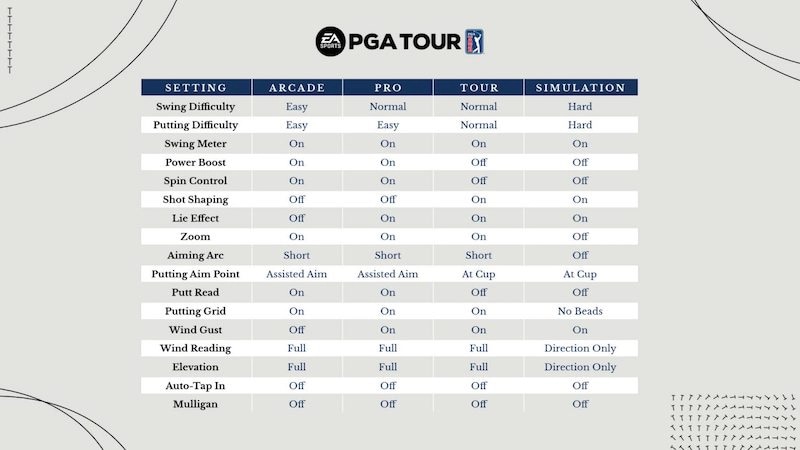
How to change your gameplay style
To change your gameplay style, follow these steps.- 1From the main menu, toggle through the tabs and select Settings.
- 2Select Gameplay and choose Gameplay Style.
- 3Toggle through the gameplay styles and choose from:
- Arcade
- Pro
- Tour
- Simulation
- Custom (allows you to choose your own setting levels).
- 4Select Apply Changes and Save.