Overview
Immortals of Aveum is a single-player, first-person magic shooter. Here’s everything you need to summon your magic and start playing Immortals of Aveum.
Where to play Immortals of Aveum
Immortals of Aveum is available to play on:- PC on the EA app, Steam, and Epic
- PlayStation®5
- Xbox Series X|S.
How to download Immortals of Aveum
Disc installation
Digital download
Insert the game disc into your console.If you’re playing on PlayStation®5, your disc will include the whole game.If you’re playing on Xbox Series X, your disc will only include the first two levels: Seren and Training Grounds. You can play these levels after installation.Your Xbox Series X needs to be connected to the internet to download and install the rest of the levels. You can play Seren and Training Grounds while the rest of your game is downloading.
- Install the available package.
How to play Immortals of Aveum
You need to log in to your EA Account to play Immortals of Aveum. Try these steps if you need help logging in to your account.
What are Strikes?
In Immortals of Aveum, you fight by controlling three colors of magic: red, blue, and green. You can switch between colors by scrolling your mouse wheel on PC, pressing the triangle button on PlayStation 5, and pressing the Y button on Xbox Series X|S.Each color of magic offers a different combat style.
- Red magic is powerful and highly damaging, like firing a shotgun.
- Blue magic is long-range and precise, like firing a rifle.
- Green magic is rapid-fire, like firing a submachine gun.
How to change a Strike
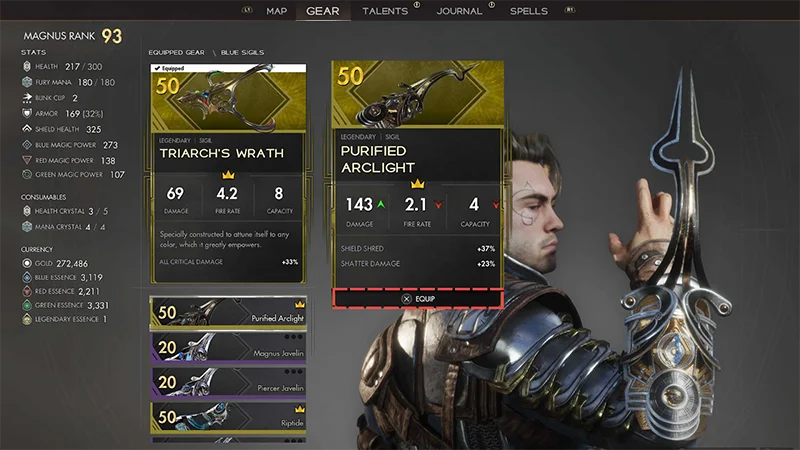
You can change which Strike spell is active by changing which sigils you have equipped. You can equip three sigils at a time—one for each magic color.- 1Go to the menu.
- 2Select the Gear tab.
- 3Scroll through your sigils. When you find one you want to equip, choose Select.
- craft them in the Forge
- buy them with in-game currency
- get them through rewards
- find them in caches.