Overview
Learn more about The Gym feature in UFC 6, including how to level up, recruit new fighters, and earn rewards.
What’s The Gym in UFC 6?
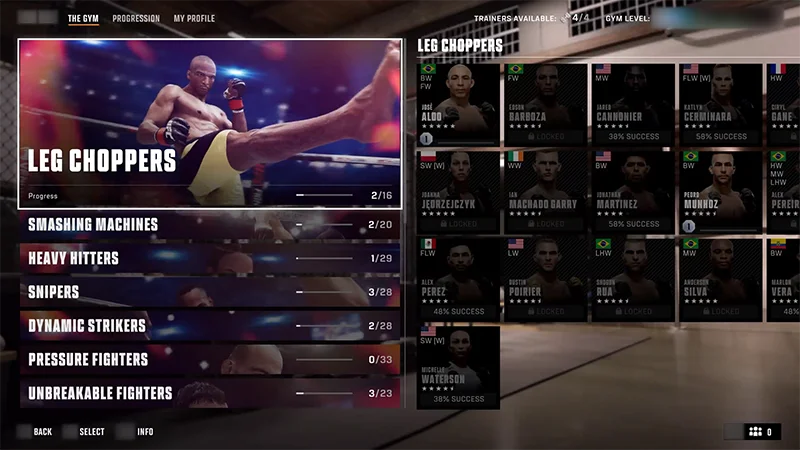
The Gym is a progression feature in UFC 6 that lets you recruit fighters, level them up, and unlock rewards. You can see:- fighters you’ve recruited
- fighters available for recruitment
- fighters unavailable for recruitment
- progress and customization options for all recruited fighters.
How to recruit more fighters in The Gym
In The Gym, you’ll have a team of Trainers who can recruit new talent or train fighters you have already recruited. Recruitment isn’t guaranteed, but you can boost your chances by using different Trainers or completing challenges.To recruit a fighter to your gym:- 1Open The Gym.
- 2Select the fighter you want to recruit.
- 3Choose a Trainer, then Confirm Trainer
- You can also select Instant Contracts to immediately recruit a fighter without waiting for the recruitment timer.
- 4Start recruitment.
Leveling up and rewards in The Gym
How to level up fighters
To level up fighters in The Gym:- 1Select the fighter from The Gym tab in Fighter Select.
- 2Use them in matches or assign Trainers to train them in The Gym to earn XP.
You can use fighters in matches while they’re also being trained in The Gym.
How to earn rewards
As fighters level up in The Gym, you’ll earn rewards like:- coins
- player card profile pictures
- player card banners
- animated banners
- Fight Kits
- Fighter Select accessories.
How to equip rewards
Some rewards need to be equipped manually.To equip fighter rewards:- 1Open The Gym.
- 2Select a recruited fighter.
- 3Go to Customize.
- 4Choose the reward you want to equip.
- 1Open The Gym.
- 2Go to My Profile.
- 3Select Customize Player Card.