Información general
Los conjuntos de galería te permiten añadir artículos de futbolista de EA SPORTS FC™ 27 Ultimate Team™ a conjuntos para obtener recompensas y aumentar tu nivel de galería.
A diferencia de los Desafíos de Creación de Plantillas (DCP), completar un conjunto de la galería no envía ni elimina los artículos de futbolista de tu club.
¿Cómo completo un conjunto de galería?
- 1Abre el menú principal.
- 2Ve a Club.
- 3Selecciona galería y elige un conjunto de la galería.
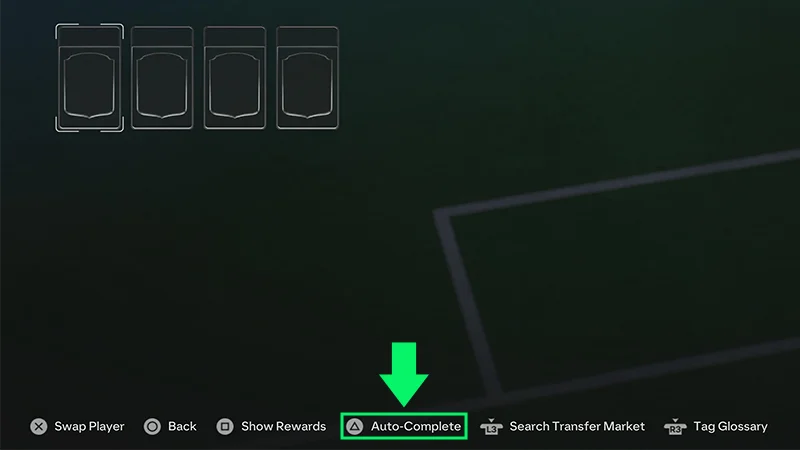
- 4Comprueba los requisitos del conjunto y añade los artículos de futbolista aptos.
- Selecciona Autocompletar para añadir automáticamente tus mejores artículos de futbolista aptos, o elige los artículos tú mismo.
- 5Selecciona Confirmar cambios.
¿Cómo funcionan las evaluaciones de los conjuntos de galería?
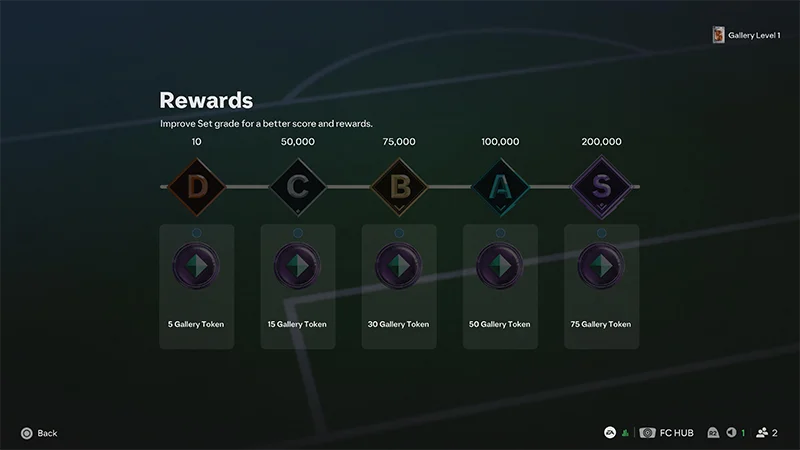
Completar un conjunto de la galería y mejorar su evaluación son cosas distintas.Completa un conjunto reuniendo los artículos de futbolista que requiere. La puntuación de artículo de los artículos de futbolista en el conjunto determina su evaluación.Los conjuntos de la galería pueden tener estos niveles:- D
- C
- B
- A
- S
¿Cómo funcionan los niveles de galería?
Aumentar tu nivel de galería te ayuda a progresar en los objetivos de galería para ganar recompensas adicionales.Sigue completando conjuntos de la galería y mejorando las evaluaciones de los conjuntos que ya hayas completado para progresar en tu galería.Preguntas frecuentes sobre los conjuntos de galería
No. Los artículos en cesión no pueden incluirse en la galería y no cuentan para los conjuntos de la galería.La mayoría de los demás artículos de futbolista que consigas en sobres, Mercado de transferibles, objetivos, DCP y otras recompensas de Ultimate Team™ se pueden añadir a tu galería.
Sí, puedes usar el mismo artículo de futbolista en varios conjuntos de la galería.
Sí. Si pasas directamente a una evaluación S, obtendrás todas las recompensas de los niveles inferiores.
Las mejoras de Evolución de EA SPORTS FC™ Ultimate Team™ no se transfieren a la galería.Si mejoras un artículo de futbolista mediante una Evolución, su entrada en la galería seguirá basándose en la versión original del artículo.
Las fichas de la galería son recompensas que puedes obtener al evaluar conjuntos de la galería. Evaluaciones más altas pueden desbloquear recompensas adicionales, incluidas fichas de la galería.Puedes gastar fichas de la galería en la Tienda de fichas de la galería en recompensas como equipaciones, escudos y artículos base de Hall of FUT.Las recompensas de la Tienda de fichas de la galería pueden cambiar a lo largo de la temporada.
Los artículos de futbolista no tienen que estar en tu club para estar disponibles en la galería. Si un artículo de futbolista apto pasa por tu club, puede seguir contando para tu galería después de venderlo.