Información general
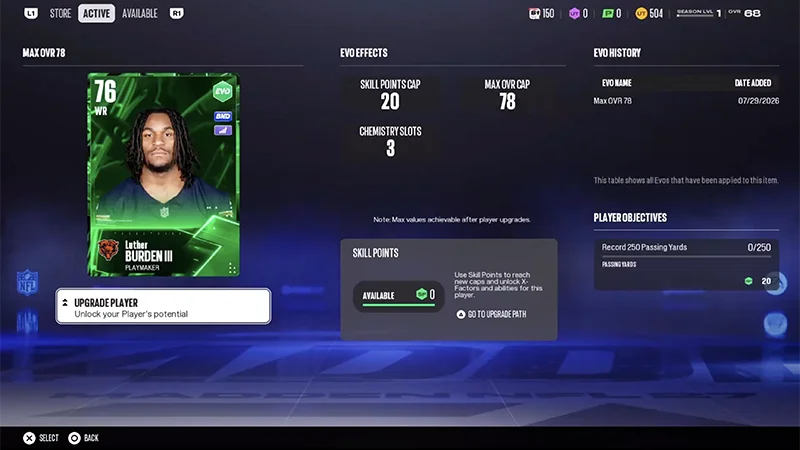
Personaliza artículos de jugador elegibles con Evoluciones (Evos) desbloqueando nuevas opciones de mejora y aumentando su potencial. Según la Evo que elijas, puedes mejorar atributos, desbloquear rutas de mejora, obtener nuevas habilidades, ampliar opciones de química y más.
¿Qué son las Evos?
Las Evoluciones (Evos) son una característica de Ultimate Team que te permite mejorar artículos de jugador elegibles y seguir desarrollándolos con el tiempo. Con las Evos, puedes:- aumentar los límites de OVR del jugador
- desbloquear nuevas rutas de mejora.
- añadir o mejorar habilidades
- ampliar la vida útil de los jugadores de tu plantilla
- reducir los costes de puntos de habilidad
- ampliar las opciones de química
- ganar mejoras adicionales
- desbloquear nuevos objetivos para artículos de jugador.
¿Cómo uso las Evos?
Antes de aplicar una Evo, revisa la vista previa para ver qué puede cambiar. Según la Evo, podrás ver cambios en aspectos como el GRL máximo, las rutas de mejora, las habilidades, las opciones de química o los atributos.
Aplicar una Evo
Mejorar una Evo
- 1Desde el centro de Ultimate Team, ve a Mercado en el menú superior.
- 2Selecciona la Tienda de Evoluciones.
- 3Explora las Evos disponibles.
- 4Selecciona una Evo para revisar sus requisitos y efectos.
- 5Elige un artículo de jugador elegible.
- 6Confirma tu selección para aplicar la Evo.
¿Cómo puedo encontrar jugadores elegibles para una Evo?
No todos los artículos de jugador se pueden usar con cada Evo. Si tu jugador no aparece como opción, revisa los requisitos de las Evos para asegurarte de que tu jugador cumple los requisitos.
- 1Desde el centro de Ultimate Team, ve a Tienda de evoluciones.
- 2Explora las Evos disponibles.
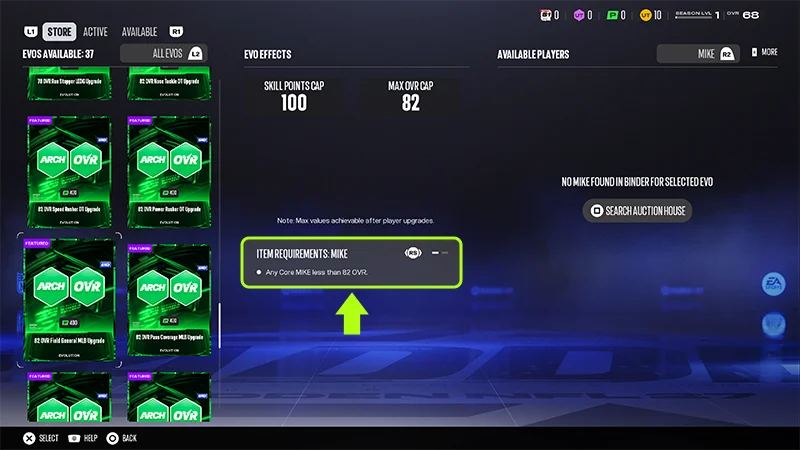
- 3Selecciona una Evo para revisar sus requisitos.
- 4Explora la lista de artículos de jugador elegibles. Los jugadores aplicables aparecerán automáticamente.
- posición
- programa
- requisitos del artículo de jugador
- otros requisitos específicos de Evo.
Preguntas frecuentes sobre Evos
No. Los objetos de jugador que cumplan los requisitos de elegibilidad de una Evo se pueden usar con esa Evo.
No. Cada Evo ofrece mejoras y efectos diferentes. Revisa los detalles de la Evo antes de aplicarla para ver qué cambios puede hacer.
Sí. Antes de aplicar una Evo, puedes revisar sus detalles para ver qué efectos puede tener en un artículo de jugador elegible.