Overview
Battlefield 6 REDSEC Ranked has seven ranks to reach, from Rookie to Master, by earning Ranked Points (RP) in matches. Earn points with kills, placements, and assists to climb each division and rank. Use our guide to learn how Ranked works and get help with missing rewards or crashing, freezing, and lag.
What’s Ranked?
Battlefield REDSEC Ranked is a competitive mode with a unique progression system. You’ll play against squads of a similar rank and earn Ranked Points to level up, earning rewards along the way.Ranked is only available in Battlefield REDSEC. You can learn more about it in our Battlefield REDSEC guide.How do I play Ranked?
If you own Battlefield 6, you automatically have access to Battlefield REDSEC and Ranked.- Go to the Play tab and choose Ranked to start playing.
- You need to be at least Career Rank 5 to join Ranked matches.
Ranked matches are played as Battle Royale Squads: 25 squads of four players fight until the last squad’s left standing. Like other REDSEC Battle Royale modes, you’ll have to avoid the deadly ring as you play.
To start playing Ranked, you need to be at least Career Rank 5. You can earn Career XP across Battlefield 6 and Battlefield REDSEC to earn your spot.
In Season 4, matchmaking will use players across a broader range of ranks. Learn more about the development of matchmaking in our guide.Squads can only be made up of players of similar ranks.
- All players in a squad must either be equally ranked or within two ranks of each other.
- For example, a Silver ranked player can squad up with: Rookie, Bronze, Silver, Gold, and Platinum.
PC and console players are matched separately.Players who own Battlefield 6 can play with users who only have REDSEC.
- A full squad of PC players will be matched with other PC players.
- A full squad of console players will be matched with other console players.
- If you’re in a mixed squad of PC and console players, you’ll be put in PC matchmaking.
In Ranked, you can only queue in groups of four as one squad.
Some vehicles, like scout helicopters and the 7.7M NSW RHIB, are available in Ranked. From Season 4, Vehicle Keycards, Main Battle Tanks, and Infantry Fighting Vehicles won’t be available to use. Learn more about what's changing in Season 4.
How many ranks are there?
When you start Ranked, you’ll be Unranked. From here, you can earn Ranked Points (RP) to rank up.- Rookie
- Bronze
- Silver
- Gold
- Platinum
- Diamond
- Master
- 1Go to your Player Profile.
- 2Select Competitive Rank.
- 3This opens the Ranked Hub, where you can see the leaderboard.
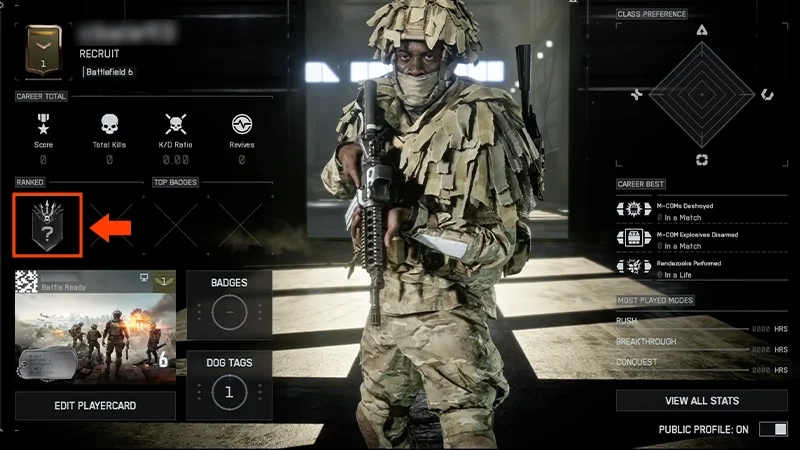
- 1Select the Profile tab from the main menu.
- 2On the left of the screen, look under Ranked to see your current rank.
Do Ranked matches have entry fees?
From Bronze up, it costs Ranked Points to enter Ranked matches. The cost depends on your rank and gets higher with each one. Your goal in every match should be to earn back the match entry fee to make sure you stay in your current division. When you’ve earned back the entry cost, you should focus on earning additional RP to progress towards your next division or rank.From Season 4, this is how many Ranked Points it’ll cost to enter a match.| Column 1 | Column 2 | ||
|---|---|---|---|
| Rank | Ranked Points entry cost | ||
| Rookie | 0 | ||
| Bronze | 20 | ||
| Silver | 30 | ||
| Gold | 35 | ||
| Platinum | 50 | ||
| Diamond | 60 | ||
| Master and Elite Top 250 | 90 |
You can lose RP if you join a match with an entry fee and don’t earn it back.
How do divisions work?
Each rank is also split into five divisions. For example, the Bronze rank is split into:- Bronze I
- Bronze II
- Bronze III
- Bronze IV
- Bronze V.
You earn Ranked Points in matches through actions like kills, assists, and placements.
| Column 1 | Column 2 | ||
|---|---|---|---|
| Kills confirmed | When you down an enemy and this enemy bleeds out or is finished. | ||
| Assists confirmed | When you assist in downing an enemy and this enemy bleeds out or is finished. | ||
| Placements | Your final placement in a match, like coming first. |
The amount of Ranked Points you can earn from kills and assists is capped per match. To rank up faster during a Season, you need to combine placement, kills, and assists to earn the most RP at the end of each match. Focus on winning—support your squad, take on fights carefully, and play the objective.
Why did my rank change?
Your rank can change during a Season if you’re demoted or when Ranked resets. When a new Season starts, your rank will be recalculated.When you start paying Ranked Points to enter matches, there’s a chance you might not earn enough Ranked Points to cover the cost—meaning you can end up with less than you started with. If this happens often enough, you could slip back a division or rank.
To protect you from immediate demotion, you’ll be given a number of Shields every time you enter a new division or rank. If you’re meant to be demoted but have a Shield, you’ll keep your current place, giving you the opportunity to stay in your current division or rank. Play strategically in the next match to keep making progress.
There are penalties for leaving a match early. If you quit a match, you’ll pay the match entry fee and lose all Ranked Points you earned during the match.
As long as you stay in the match, you won’t face penalties if someone in your squad leaves.
What are Ranked resets?
Ranked resets at the end of each Season when a new Season begins.- You’ll be assigned a new rank based on your final rank in the last Season you played.
- You’ll start the Season with all demotion Shields for that rank.
- You’ll be able to see your new rank when the new Season starts.
Check ea.com for the latest news on Ranked Season dates.You can also get information about Ranked in-game. If a lock symbol is visible, it means Ranked is currently inactive and the Season resets soon. You can’t play Ranked when there isn’t an active Season.
- 1When a Season of Ranked is active, go to the Play menu and choose Ranked.
- 2Look for a clock symbol near the top-left of your screen.
- This shows how much time is left in the current Season.
If your rank has reset to Unranked during a Season reset, there might be a bug. Check @Battlefield to see if they’ve reported any problems, or head to EA Forums to see if anyone’s reported a bug.
When do I get Ranked rewards?
You’ll get Ranked rewards each time you enter a new rank or division for the first time and at the end of the Season.- Rewards you earn for reaching a new rank or division should be delivered immediately.
- If you can’t find your rewards, follow the steps below.
- The rewards you get at the end of the Season will match the rank you finished with that Season.
- You’ll also earn rewards for every rank you pass. For example, if you finish Silver, you’ll get rewards for Rookie, Bronze, and Silver.
You earn rewards based on your finishing rank, not the highest rank you reached during a Season.
If you think you’ve earned something and it hasn’t come through, make sure: If your reward still hasn’t arrived, troubleshoot with our Battlefield 6 missing content guide.
- you met the conditions to earn the reward (division and rank)
- if the item will be delivered at the end of the Season
- you’ve waited for 24 hours—some items can take more time to come through.
What can I do if my game crashes, freezes, or lags?
If you’re having trouble staying connected in matches:- 1Check the EA and Battlefield server status.
- 2Check @Battlefield to see if they’ve reported any problems.
- 3Troubleshoot your connection with our gameplay connection guide.
- 4Use our platform crashing and freezing guide to troubleshoot your device.