The STAR WARS™ Discord is a place to connect with other players. Learn how to manage interactions with other users, report inappropriate behavior, understand moderation actions, and submit an appeal.
The STAR WARS™ Discord is a community where you can connect with other players and find fellow fans from across the galaxy.To join, visit the STAR WARS™ Discord.
The STAR WARS™ Discord is available globally, but text channels are only available in English.
How do I ignore, block, or report other Discord users?
If another user is behaving inappropriately or sharing content that breaks our rules, you can ignore, block, and report users on Discord by selecting their profile and choosing the action you want to take.
We want to keep the STAR WARS™ Discord community enjoyable, inclusive, and safe for everyone. To make that possible, all users need to follow the server rules and treat other users with respect.
If you want to hide notifications and activities from another user on the STAR WARS™ Discord without letting them know, right-click or long press their profile and select Ignore.When you ignore a user, their messages, notifications, profile, and activities are hidden from you.The user can still see your profile, send messages, and interact with you, but you won’t receive notifications from them. They also won’t know you’ve ignored their account.For more, visit the Discord Support website to learn how to ignore another user and what happens when you do.
To block another user on the STAR WARS™ Discord, open their profile from the Member’s List, select the ellipsis (three dots), then choose Block. When you block a user, they can no longer send you direct messages, and you won’t receive notifications related to their activity.For more details on how to block another user, check out the blocking and privacy settings article on the Discord Support website.
If you come across inappropriate content or something that breaks the rules on the STAR WARS™ Discord, you can report another user or a message.
1
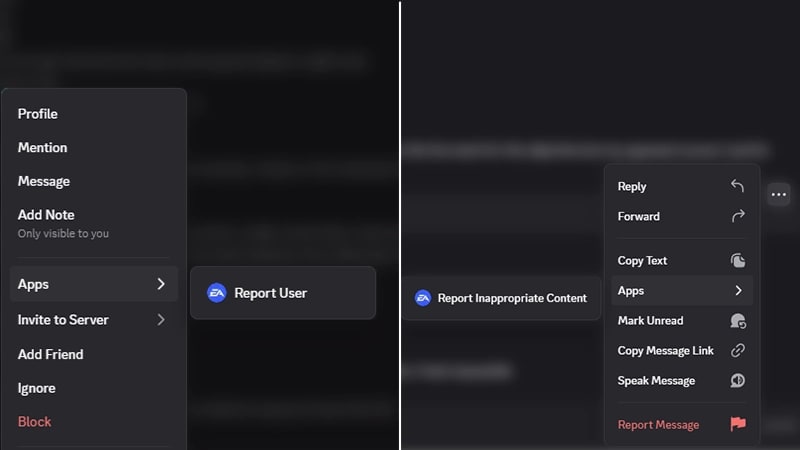
In a text channel, select the username or message you want to report.
If you’re using the Discord desktop app or in a browser window, right-click the username or message.
If you’re using Discord on your phone, tap and hold the username or message.
2
Select Apps from the pop-up menu.
3
If you’re reporting a player, choose Report User to EA. If you’re reporting a message, choose Report Message to EA.
When you submit a report, it’s processed by automation tools and sent to our team for review.Our team reviews each report and its context before deciding whether our rules were broken and what action to take. You’ll get a direct message (DM) from the EA Moderator app with an update on the outcome of your report, including whether we took action. Make sure you have direct messages enabled in Discord to get this update.For privacy reasons, we can’t share information about our investigation or what specific actions we take on another player’s account.
What can lead to moderators applying an action on a user?
Moderators help keep the STAR WARS™ Discord safe and welcoming for all users. If a user breaks the server rules, moderators may take action against them. Examples of behavior that moderators may take action against include, but aren’t limited to:
harassment
abusive language
sharing inappropriate content
using inappropriate usernames, nicknames, profile details, or avatars.
Depending on the situation, STAR WARS™ Discord moderators may take action against users who break the rules by:
removing posts or messages
sending a warning
applying a timeout (mute)
temporarily or permanently banning them from the STAR WARS™ Discord.
Not all rule violations result in the same action. The action taken can depend on the seriousness of the behavior and whether the user has broken the rules before.
How do I appeal a moderation action taken against me?
If you think a moderation action taken against you on the STAR WARS™ Discord was a mistake, you can appeal in your Discord direct messages (DMs) or on EA Help.You can appeal:
warnings
timeouts (mutes)
a temporary or permanent ban from the STAR WARS™ Discord.
After you submit your appeal, a member of our moderation team will review it.
To fill out the appeals form in your DMs, make sure you have direct messages enabled in Discord.
1
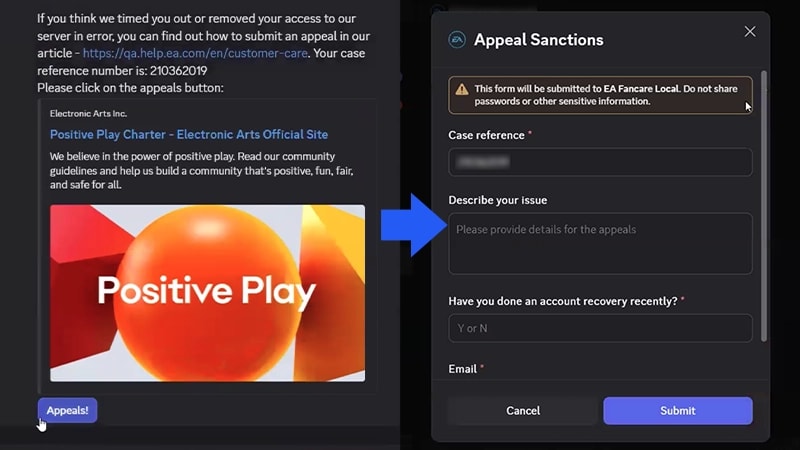
Open your DM from EA Moderator.
2
Select the Appeals button directly from the DM.
3
Fill out the form.
Your case reference number will be filled out for you.
Describe your issue and why you’re appealing the ban.
Confirm if you've done an account recovery recently. Type Y if you have, or N if you haven’t.
Add your email.
4
Select Submit.
If your access to the server has been removed after a moderation action was taken on your account, you won’t be able to post messages or accept invitations to new channels.If you can’t access Discord, submit an appeal through EA Help.Complete the appeal form and choose Submit a Discord appeal as your issue.
You can find your case reference number in the Discord direct message (DM) that the EA Moderator app sent you.To make sure we can help you, enter the case reference number exactly as it appears in the direct message.
Want to contribute towards a positive and inclusive gaming community? Check out our Positive Play Charter.
Still having issues?
Get in touch with our customer support team for more help.