Overview
Learn how to use keyboard and mouse controls, PlayStation® controllers, and Xbox controllers in MySims: Cozy Bundle. This guide explains the default controls for movement, building, camera controls, and gameplay actions.
How do I use keyboard and mouse controls on PC?
If you need some beginner tips, check out our MySims: Cozy Bundle beginner guide.
MySims keyboard and mouse controls
Keyboard buttons- W/A/S/D
- Move and rotate objects
- Esc
- Pause, or Exit without saving
- Tab
- Open My Stuff, or toggle Build/Paint Mode
- Shift
- Hold to duplicate
- Ctrl
- Toggle Paint Buckets
- Right arrow/Left arrow
- Rotate camera
- Q/E
- Cycle through options
- F
- Select
- B
- Open your Backpack, or Essences in Paint Mode
- T
- View Tasks
- M
- Open the Map, or Decoratives
- Up arrow/Down arrow
- Zoom in/Zoom out
- Left button
- Select
- Right button
- Hold to rotate camera/Back/Delete
- Scroll wheel
- Zoom in/Zoom out

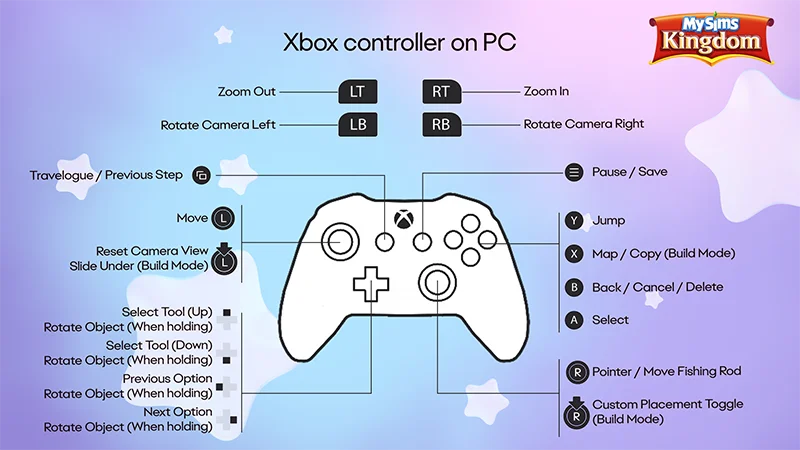
MySims Kingdom keyboard and mouse controls
Keyboard buttons- W/A/S/D
- Move and rotate objects
- Space bar
- Jump
- Esc
- Pause, or Exit without saving
- Tab
- Cycle through Tools
- Shift
- Build Mode modifier (hold)/Duplicate/Rotate
- Q/E
- Cycle through options
- Enter/F
- Select
- T
- Open your Travel Log
- M
- Map
- Up arrow/Down arrow
- Zoom in/Zoom out
- Right arrow/Left arrow
- Rotate camera
- Left button
- Select
- Right button
- Hold to rotate camera/Back/Delete
- Scroll wheel
- Zoom in/Zoom out
Can I use a PlayStation® controller on PC?
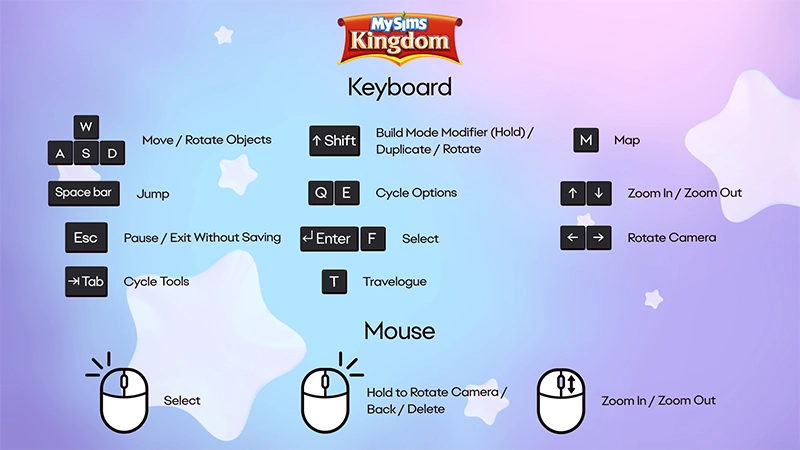
If your PC has a supported operating system, you can use a PlayStation® controller to play MySims and MySims Kingdom.Learn how to pair a PlayStation® controller with your PC on the PlayStation® Support website.MySims PlayStation® controls on PC
- L1
- Rotate camera left
- R1
- Rotate camera right
- L2
- Zoom out
- R2
- Zoom in
- Touch pad
- View Tasks or My Stuff
- Up button
- Snap mode (while in Build Mode)
- Down button
- Slide under mode (while in Build Mode)
- Left button
- Previous option
- Right button
- Next option
- Left stick
- Move and rotate objects
- L3
- Reset camera view, or Ghost image
- Options button
- Pause, Save, or Exit
- Triangle button
- Open your Backpack
- Square button
- Open the Map, or Tasks, or Decoratives, or Copy (while in Build Mode)
- Circle button
- Go back, cancel, or delete
- Cross button
- Select
- Right stick
- Pointer/Move fishing rod
- R3
- Toggle Hand/Paint Mode
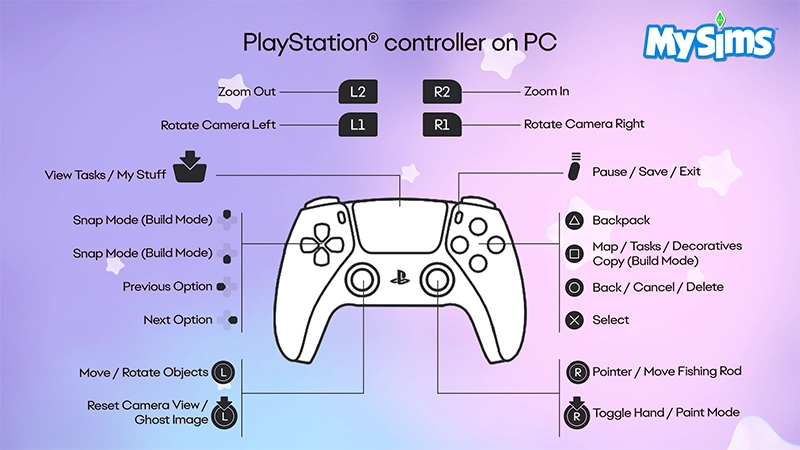
MySims Kingdom PlayStation® controls on PC
- L1
- Rotate camera left
- R1
- Rotate camera right
- L2
- Zoom out
- R2
- Zoom in
- Touch pad
- Open your Travel Log/Previous step
- Up/Down button
- Select tool, or rotate object (when holding)
- Left button
- Previous option, or rotate object (when holding)
- Right button
- Next option, or rotate object (when holding)
- Left stick
- Move
- L3
- Reset camera view, or Slide under (while in Build Mode)
- Options button
- Pause or Save
- Triangle button
- Jump
- Square button
- Open the Map, or Copy (while in Build Mode)
- Circle button
- Go back, cancel, or delete
- Cross button
- Select
- Right stick
- Pointer/Move fishing rod
- R3
- Custom placement toggle (while in Build Mode)
Can I use an Xbox controller on PC?
If your PC has a supported operating system, you can use an Xbox controller to play MySims and MySims Kingdom.Learn how to connect an Xbox controller to your PC on the Xbox Support website.MySims Xbox controls on PC
- Left bumper (LB)
- Rotate camera left
- Right bumper (RB)
- Rotate camera right
- Left trigger (LT)
- Zoom out
- Right trigger (RT)
- Zoom in
- View button
- View Tasks or My Stuff
- Left thumbstick
- Move or rotate objects
- Left thumbstick (click)
- Reset camera view, or Ghost image
- Up button
- Snap mode (while in Build Mode)
- Down button
- Slide under mode (while in Build Mode)
- Left button
- Previous option
- Right button
- Next option
- Menu button
- Pause, Save, or Exit
- Y button
- Open your Backpack
- X button
- Open the Map, Decoratives, or copy (while in Build Mode)
- B button
- Go back, cancel, or delete
- A button
- Select
- Right thumbstick
- Pointer/Move fishing rod
- Right thumbstick (click)
- Toggle Hand/Paint Mode

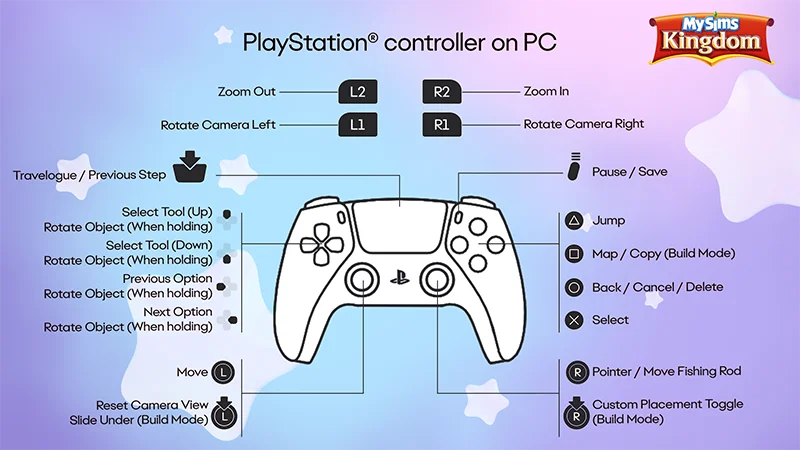
MySims Kingdom Xbox controls on PC
- Left bumper (LB)
- Rotate camera left
- Right bumper (RB)
- Rotate camera right
- Left trigger (LT)
- Zoom out
- Right trigger (RT)
- Zoom in
- View button
- Open your Travel Log/Previous step
- Left thumbstick
- Reset camera view, or Slide under (while in Build Mode)
- Left thumbstick (click)
- Reset camera view, or Slide under (while in Build Mode)
- Up/Down button
- Select tool, or rotate object (when holding)
- Left button
- Previous option, or rotate object (when holding)
- Right button
- Next option, or rotate object (when holding)
- Menu button
- Pause or Save
- Y button
- Jump
- X button
- Open the Map, or Copy (while in Build Mode)
- B button
- Go back, cancel, or delete
- A button
- Select
- Right thumbstick
- Pointer/Move fishing rod
- Right thumbstick (click)
- Custom placement toggle (Build Mode)