Overview
Update your email and manage your email preferences in the Account information page of your EA Account. Learn about the different email settings and how to change them.
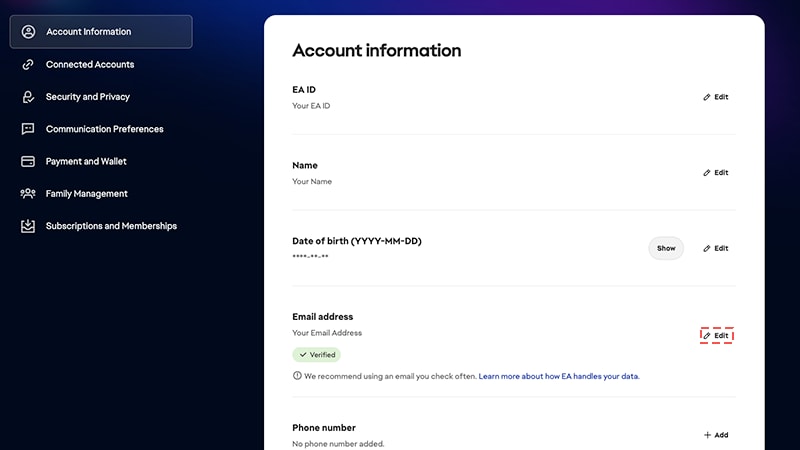
Change the email on your EA Account
You can only update your email address once every 30 days. You can change your email address back to an old one that was previously associated with your account.
- 1Go to your Account information page.
- 2Find Email Address and select Edit to update the email that we have on file.
- Use a secure email address you’ll always have access to, like Yahoo or Gmail, instead of one from school or work. You’ll use your email address to recover your account if you ever need to, and we'll use this email address to verify your EA Account.
Can’t remember the email address you used to create your account?
See if our steps can help you find your EA email address.Don’t have access to the email address you used to create an EA Account?
Follow these steps to get back in to your account.
See if our steps can help you find your EA email address.Don’t have access to the email address you used to create an EA Account?
Follow these steps to get back in to your account.
Find and update your communication preferences
You can find and update your email settings under the Communication Preferences tab of your EA Account.From here, you can update when and how you get emails from us. Toggle on Email me about EA's products, news, events, and promotions to decide if you want occasional emails with EA’s latest news. If you choose to get emails from us, you can decide:- the Frequency of our emails (anytime, weekly, or monthly)
- which games you want to hear about under Favorite games
- and which platforms you play on.
