개요
Learn how to confirm your age in the EA app so you can access age-restricted games, features, and purchases.
Effective March 2026, Brazil’s ECA Digital Law requires verified age check for certain games. To access some content and features, players will need to:This applies to the EA app and some console and mobile games.Access to social features and user-generated content (UGC) in-game on the EA app will be restricted to adult accounts. These requirements apply only to players in Brazil and only to affected games. Learn more in our age check article.
- 1Log in to or create an EA Account.
- 2Confirm they’re 18 or older.
How to confirm your age in the EA app
If you’re asked to confirm your age, you’ll see an age assurance screen when you try to:- launch a game that features random content mechanics
- buy premium currency for those games in the EA app
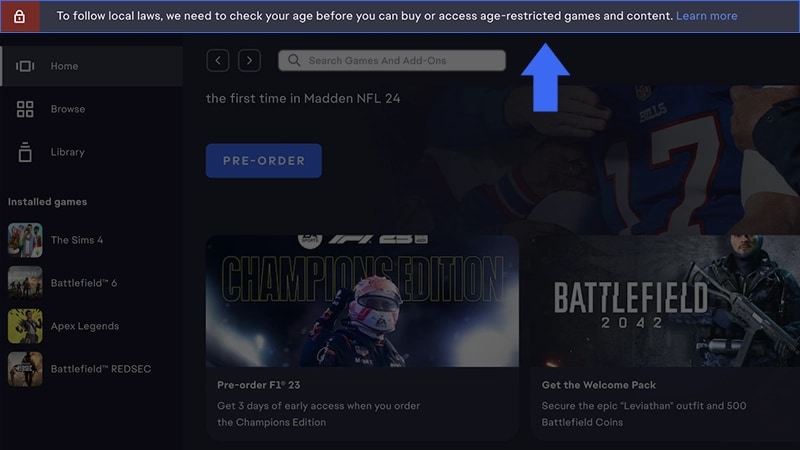
- 1Select START in the banner at the top of the EA app.
- 2Scan the QR code or choose to continue on your device.
- 3Carefully read the age check information, then select Start.
- 4Complete the verification steps shown on screen.
- 5Once confirmed, select Close or Continue.
Not playing on the EA app? Learn how to confirm your age via EA.com, your console, or your mobile device.
Why you might need to reconfirm your age
You may need to complete age assurance again if:- you change your date of birth
- your account was compromised or recently recovered
- your previous verification method expires
- we detect conflicting account information
- another platform (like Xbox, PlayStation®, Apple, or Google) shows a different confirmed age
- you merge accounts
- you delete and restore your EA Account
- EA updates its age assurance policy.
What happens if you don’t confirm your age
If you don’t confirm your age, you may not be able to:- access games that feature random content mechanics
- buy premium currency for those games
Parental consent doesn’t automatically confirm an account as an adult. Without a confirmed age check, restrictions may still apply. Learn more about parental consent and age check impacts on child accounts.