Overview
You can use Dynasty Points in your Dynasty Blueprint for staff, facilities, and NIL. Learn how to earn Dynasty Points and how to manage your Dynasty Blueprint budget throughout the year.
What are Dynasty Points?
In Dynasty mode, you use the Dynasty Blueprint to control how your program spends its resources. Dynasty Points make up your annual budget.What can I spend Dynasty Points on?
You can spend Dynasty Points across your coaching staff, your facilities, and for name, image, and likeness (NIL).If you play as a head coach, you’re responsible for building out your staff. Support staff are people like recruiting staff, trainers, and fundraisers who help make your program a success. They can give your team benefits, like reducing NIL expectations from players, increasing weekly recruiting hours, or decreasing the Dynasty Point cost of hiring other support staff.Support staff come in Bronze, Silver, Gold, and Platinum tiers. Higher-tier support staff are more expensive, but have stronger effects.The number of support staff you can have depends on your Team Prestige. You can hire:Coordinators (offensive and defensive) help manage your team’s playbooks, strategy, and players.
- one support staff slot per prestige level
- a maximum of five support staff
- a maximum of one support staff member of each type.
- Each coordinator has an expected Dynasty Point value.
- This is influenced by things like coach level and your school’s Team Prestige.
- High-level coaches will be more expensive.
You have direct control over your Athletic Facilities grade in EAS College Football 27. Better facilities can help your player progression, your recruiting profile, and ultimately, your team’s performance. Your Athletic Facilities grade is determined by your facility and your equipment.Your facility tier sets the grade range your program can reach and the number of equipment slots you can have. You can upgrade or downgrade your facilities once at a year during the End of Season recap.
Higher grade facilities cost more to maintain. If you can’t or choose not to pay, your facility will downgrade by one tier and your annual maintenance cost will be reduced, freeing up some Dynasty Points. If you choose to upgrade back to your previous tier, the upgrade cost will be reduced because your program was already operating at that level.Equipment can give you extra improvements, like increasing your Athletic Facilities grade within your facility’s range, reducing Wear and Tear, and lowering practice injury chances.
| Column 1 | Column 2 | ||
|---|---|---|---|
| Basic Facility | F (1 slot) | ||
| Competitive Facility | D- to D+ (2 slots) | ||
| Premier Facility | C- to C+ (3 slots) | ||
| Elite Facility | B- to B+ (4 slots) | ||
| National Powerhouse | A- to A+ (5 slots) |
There are two types of NIL you can manage with Dynasty Points: recruiting and roster NIL. Recruiting NIL is about talent acquisition. It lets you compete for prospects and transfers. Roster NIL is about retaining players. Every prospect and player has an expected NIL level. Here’s what influences it.
A player’s expected NIL can change as their career progresses.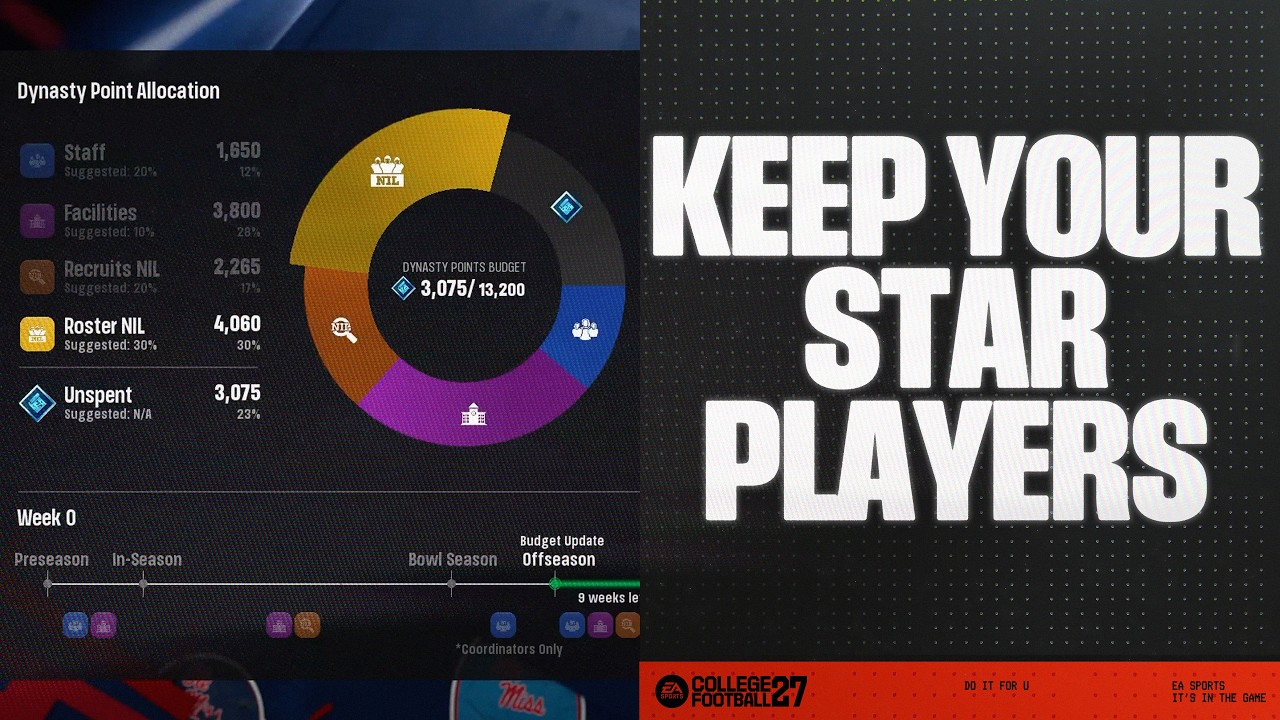
| Column 1 | Column 2 | ||
|---|---|---|---|
| Recruits | Star rating, position, dealbreaker, and your Team Prestige. | ||
| Roster Players | Overall rating, position, school year, awards won, dealbreaker, Team Prestige, and what you’ve offered in the past. |
How do I earn Dynasty Points?
Factors like your school identity, season payouts, and Athletic Director Expectations give you opportunities to earn more Dynasty Points.How many Dynasty Points you earn is influenced by elements of your school identity, like Conference Prestige, Brand Exposure, Stadium Atmosphere, and Program Tradition grades. Schools with stronger brands, bigger stages, richer traditions, and more powerful conference standing will have more resources.
You can earn Dynasty Points through season payouts, like:
- winning your conference
- reaching the College Football Playoff
- winning bowl games
- capturing a National Championship.
Some AD Expectations can help you earn Dynasty Points. Your Athletic Director might reward you with Dynasty Points for meeting a critical program objective, like:
- winning a rivalry game
- reaching the College Football Playoff
- controlling a recruiting territory.
The Contract Incentives ability from the Rainmaker archetype increases the number of Dynasty Points you get from completed Athletic Director Expectation goals.
How does the Dynasty Blueprint budget work?
Your Dynasty Blueprint budget refreshes every year during the End of Season recap stage, giving you a new budget to spend on your program.Dynasty Points don’t roll over across years. If you don’t use all your Dynasty Points within the year, you’ll lose them.
Every coach has a Blueprint Strategy which represents how they want to build their program and suggests a spending allocation across each category. You can edit your Blueprint Strategy from Edit Coach or the Dynasty Blueprint Hub. Blueprint Strategy doesn’t automatically spend your Dynasty Points, but gives you comparisons against your actual spending.
You can choose to set up Auto Settings that automatically manage parts of your Blueprint.
| Column 1 | Column 2 | ||
|---|---|---|---|
| Full Blueprint Management | The game automatically manages all Blueprint spending following the Blueprint Strategy you’ve selected. | ||
| Auto Support Staff | The game automatically manages support staff hiring during the preseason. It won’t hire offensive or defensive coordinators. | ||
| Auto Facilities | The game automatically manages facility spending and allocation. |
You’ll get any payouts you earn from Athletic Director Expectations or season accomplishments during your End of Season recap. You can increase your yearly payout by improving your My School grades and meeting performance incentives.
How do I manage my Dynasty Blueprint?
Different parts of your Dynasty Blueprint become available at different times of the Dynasty calendar, meaning you’ll need to check in and make changes across the year. Here’s what you can set at each stage.The preseason is for setting your foundation.
- Hire and fire support staff.
- This group is locked-in when the season begins and can’t be changed until the next season.
- Purchase equipment upgrades for your facilities.
- Scout new players.
- You can’t offer scholarships during the preseason.
You can start building your roster during the regular season.
- Use recruiting NIL to compete for high school prospects.
- You can offer scholarships from Week 0.
- Keep investing in equipment.
Bowl season is about managing the coaching carousel.During the carousel, you’ll see a full list of available coaches who you can hire as coordinators, including stats like their current school, current role, interest level, and expected Dynasty Point value. When you decide to make an offer, you’ll be taken to the Coach Abilities screen, where you can review a coach’s archetypes, strengths, and weaknesses, and adjust your Dynasty Point offer.You can:You can see the resolution order of your offers in the Manage Staff screen. If the first coach accepts, the remaining offers for that position won’t be considered anymore.
- Hire offensive and defensive coordinators.
- You can’t change support staff at this stage.
- offer above or below a coach’s expected Dynasty Point value, which might increase or lower their interest
- offer up to two times a coach’s expected value
- make offers to six offensive and six defensive coordinators.
- If you don’t hire a coordinator by the end of the coaching carousel, one will be assigned to you.
- If you’re low on Dynasty Points, you can also look at free agent coaches.
- These coaches cost nothing, but are generally less experienced.
Here, you can begin shaping your next Dynasty Blueprint.
- Your budget refreshes during the End of Season recap.
- This includes any Athletic Director Expectations or season accomplishments payouts.
- Make major building upgrades to your facilities.
- NIL becomes central for transfer recruiting and roster retention.