Overview
Use aim, spin, and power to control free kicks in EA SPORTS FC™. Learn how to aim a free kick, change how you strike the ball, choose the right amount of power, and practice different free kick techniques.
What are the controls for free kicks?
The controls depend on your platform and control configuration. To find your controls from the Main Menu:- 1Select Play.
- 2Select Learn to Play.
- 3Open Practice Arena.
- 4Pause the game.
- 5Select Button Help to view your controls, or Skill Moves Help to view Skill Move controls.
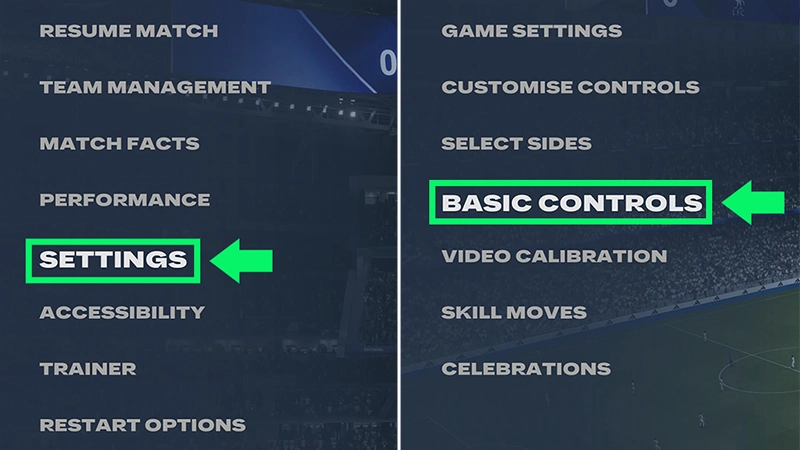
- 1Pause EA SPORTS FC™.
- 2Go to Settings.
- 3Select Basic Controls.
How to take a free kick
- 1Choose your free kick taker.
- Consider attributes like Free Kick Accuracy, Curve, and Shot Power when choosing a player.
- 2Aim your free kick.
- Move your aim toward the part of the goal you want to target.
- 3Choose how you want to strike the ball.
- Adjusting the contact point changes the spin and trajectory of your free kick.
- 4Set the power.
- Release when you’ve added the amount of power you want.
- 5Watch the trajectory and adjust your next attempt.
- Try changing your aim, contact point, or power if the ball goes wide, hits the wall, or travels over the goal.
How spin changes a free kick
Use the on-screen trajectory line as a guide when setting up your free kick. Experiment with different contact points to learn how they affect the ball's curve and height.The best combination depends on your distance and angle from the goal, as well as the player taking the free kick.How to choose a free kick taker
When choosing between players, look at attributes that can affect free kicks, like:- Free Kick Accuracy
- Curve
- Shot Power
How to take a quick free kick
When it’s available, you can take a quick free kick instead of waiting for the full setup.Look for an open teammate before playing the ball. A quick free kick can help you restart play before the opposing team gets back into position.Some passing controls available during open play can also be used from quick free kicks, depending on your game and control settings.How to practice free kicks
The Training Center
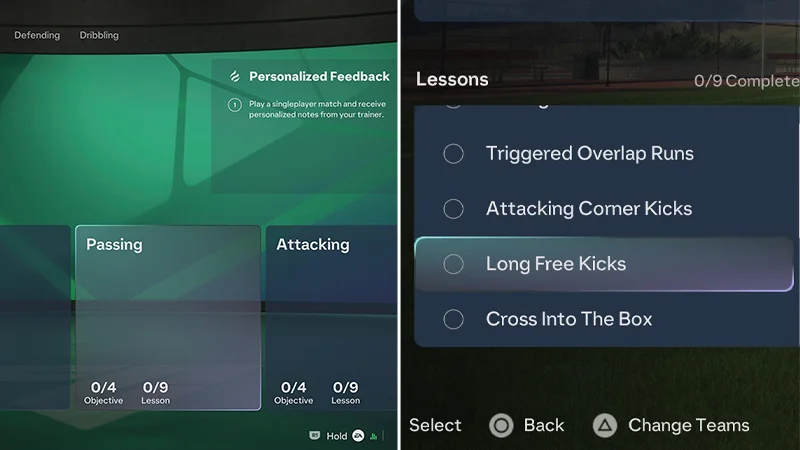
Use the Training Center to practice free kicks and get used to their aim, spin, and power:- 1Open the Main Menu.
- 2Select Learn to Play.
- 3Open the Training Center.
- 4Select one of the training options that work on free kicks:
- Passing
- Attacking.
The Practice Arena
You can also use Practice Arena to practice your aim, spin, and power without waiting for a free kick during a match:- 1From the main menu, go to Learn to Play.
- 2Select Practice Arena.
- 3Choose your settings and start practicing.
- adjust your aim
- change where you strike the ball
- increase or decrease the power
- try a different kick taker.