Podsumowanie
Dowiedz się, jak działa przepustka sezonowa w EA SPORTS FC™, co daje przepustka premium, jak zdobywać punkty w sezonie (SP) oraz gdzie znaleźć i odebrać nagrody.
Jak działa przepustka sezonowa w EA SPORTS FC™
Przepustka sezonowa pozwala zdobywać nagrody za wykonywanie zadań oraz punkty w sezonie (SP) w dostępnych trybach gry.W EA SPORTS FC™ 27 postępy w przepustce sezonowej możesz osiągać w:- Ultimate Team™
- The Grounds
- Rozgrywce na PlayStation®5, Xbox Series X|S, Nintendo Switch™ 2 oraz PC
- Trybie kariery
- Ultimate Team™
- „Klubach”
- Trybie kariery
Jak sprawdzić postępy w sezonie?
- 1Przejdź do FC Hub.
- 2Sprawdź swoje postępy na Ścieżce sezonowej.
- 3Wybierz typ zadania w lewym górnym rogu, aby zobaczyć dostępne wyzwania.
- W Ultimate Team™ przejdź do sekcji Zadania.
- W karierze menedżerskiej przejdź do karty Biuro.
- W The Grounds znajdź Zadania na Mapie świata.
Jak mogę odebrać nagrody z przepustki sezonowej?
- 1Przejdź do FC Hub.
- 2Wybierz Sezon.
- 3Zaznacz odblokowaną nagrodę.
- 4Wybierz Odbierz.
- Nagrody Ultimate Team™ pojawią się w Sklepie lub ekwipunku.
- Nagrody The Grounds pojawią się w ekwipunku.
- Nagrody w trybie kariery pojawią się w sekcji Personalizacja w karierze menedżerskiej lub piłkarskiej.
Zadania w The Grounds są dostępne tylko na PlayStation®5, XBOX Series X|S, Nintendo Switch™ 2 oraz PC. Jeśli grasz na PlayStation®4 lub XBOX One, możesz ulepszyć swoją kopię gry po zakupie odpowiedniej konsoli nowej generacji (z PlayStation®4 na PlayStation®5 lub z Xbox One na Xbox Series X|S), pobierając ją na swoją nową konsolę.
- Nagrody Ultimate Team™ pojawią się w Sklepie lub ekwipunku.
- Nagrody w Klubach pojawią się w ekwipunku.
- Nagrody w trybie kariery pojawią się w sekcji Personalizacja w karierze menedżerskiej lub piłkarskiej.
Nagrody i zadania w The Grounds na różnych platformach
Tryb The Grounds jest dostępny na PlayStation®5, XBOX Series X|S, PC i Nintendo Switch™ 2.Jeśli grasz na PlayStation®4 lub XBOX One, nadal możesz przeglądać i odbierać nagrody związane z The Grounds z przepustki sezonowej, ale aby z nich skorzystać, musisz zalogować się na konsolę PlayStation®5 lub XBOX Series X|S. Po przejściu na nowszą konsolę karty pojawią się w ekwipunku.Zadania w The Grounds są niedostępne na Nintendo Switch™.Co zyskam, po ulepszeniu do przepustki premium w EA SPORTS FC™?
Przepustka premium to opcjonalne ulepszenie przepustki sezonowej.Odblokowuje ona dodatkową ścieżkę nagród, która biegnie równolegle ze ścieżką przepustki sezonowej. Obie ścieżki wykorzystują tę samą progresję PS.Oto, co otrzymasz po ulepszeniu i osiąganiu postępów ramach przepustki premium.- Ekskluzywne karty piłkarskie
- Ekskluzywne przedmioty kosmetyczne
- Karty jednorazowe ewolucji stylu gry+
- Karty jednorazowe The Grounds (w FC 27)
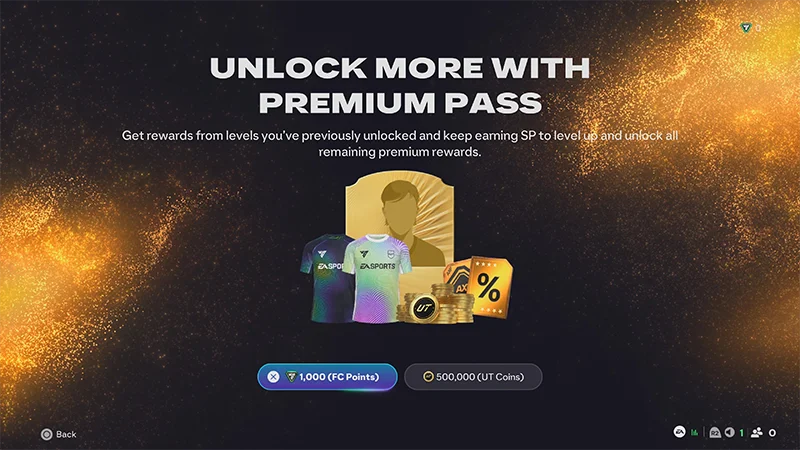
Jeśli ulepszysz do przepustki premium w środku sezonu, natychmiast odblokujesz wszystkie nagrody premium za osiągnięte już poziomy.
Jak zdobyć przepustkę premium w EA SPORTS FC™?
Aby zdobyć przepustkę premium, przejdź do FC Hub i wybierz Przejdź na wersję premium. Przepustkę premium możesz odblokować za pomocą:- EA SPORTS FC™ Points
- Możesz użyć EA SPORTS FC™ Points, aby odblokować przepustkę premium w obsługiwanych trybach.
- monety Ultimate Team™
- Możesz użyć monet Ultimate Team™, aby odblokować przepustkę premium, grając w Ultimate Team™.
- Ogólne żetony
- Ogólne żetony mogą być użyte do odblokowania przepustki premium na dowolny obecnie dostępny sezon. Jeśli zdobędziesz ogólny żeton i masz już odblokowany bieżący sezon przepustki premium, możesz użyć swojego ogólnego żetonu na następny sezon.
- Żetony sezonowe.
- Jeśli zdobyto żetony sezonowe, zostaną one automatycznie zrealizowane na początku wymienionego sezonu. Żetony sezonowe działają tylko na konkretny sezon. Na przykład żeton 2. sezonu może odblokować przepustkę premium tylko na sezon 2.
- trybu, w który grasz
- czy posiadasz już przepustkę premium
- czy masz już dostępne żetony
Gdzie znajdę swoje punkty w sezonie i nagrody?
Możesz uzyskać dostęp do swoich PS w FC Hub.Swój aktualny stan PS znajdziesz również na górze ekranu w Ultimate Team™ i Klubach(FC 26 i wcześniejsze wersje) lub w The Grounds (FC 27).Nie możesz znaleźć nagrody po odebraniu jej?- Upewnij się, że wybrano właściwy tryb gry.
- Sprawdź ponownie zakładki Sklep, Ekwipunek lub Personalizacja.
- Uruchom ponownie grę i sprawdź ponownie.
Często zadawane pytania dotyczące przepustki premium i przepustki sezonowej
Przepustka sezonowa jest darmowa i pozwala zdobywać nagrody za zdobywanie PS. Przepustka premium to płatne ulepszenie, które odblokowuje dodatkowe nagrody na tej samej ścieżce sezonowej.
Zakupy przepustek premium i aktywacje żetonów są zazwyczaj ostateczne.Przed potwierdzeniem zakupu upewnij się:Jeśli uważasz, że wystąpił problem z zakupem, skontaktuj się z Pomocą EA za pomocą linku u dołu tej strony.
- wybrana waluta lub żeton
- sezon, który odblokowujesz
- czy masz już dostępne żetony
Nie. PS resetują się na początku każdego nowego sezonu.
Nie. Premia PS dotyczy tylko bieżącego sezonu.
Najpierw sprawdź Ścieżkę sezonową, aby potwierdzić swój poziom. Następnie upewnij się, że wybrano Odbierz na każdej odblokowanej nagrodzie. Jeśli twoje nagrody nadal są niewidoczne, uruchom ponownie grę i sprawdź jeszcze raz w odpowiednim trybie.Jeśli nadal nie możesz znaleźć swoich nagród, skontaktuj się z nami na dole tej strony.
Nie. Dostępne waluty i opcje żetonów mogą się różnić w zależności od miejsca, w którym uzyskujesz dostęp do przepustki premium.W zależności od trybu i ekranu możesz zobaczyć:
- monety Ultimate Team™
- EA SPORTS FC™ Points
- Ogólne żetony.
Ogólne żetony mogą odblokować przepustkę premium na dowolny kwalifikujący się sezon w obecnym cyklu gry EA SPORTS FC™.Żetony sezonowe działają tylko na jeden konkretny sezon.