Обзор
Узнайте, как в EA SPORTS FC™ работают кроссплатформенная игра и общий прогресс на разных платформах.
Как работает кроссплатформенная игра?
Кроссплатформенная игра позволяет вам играть с вашими друзьями с других платформ. Для FC кроссплатформенная игра доступна на:- ПК
- PlayStation®
- Xbox.
- консоли текущего поколения (PlayStation®5, Xbox Series X|S и ПК)
- консоли предыдущего поколения (PlayStation®4 и Xbox One).
А на Nintendo Switch™?
Nintendo Switch™ и Nintendo Switch™ 2 не поддерживают кроссплатформенную игру в FC, но вы можете ознакомиться с нашим материалом, чтобы узнать, как играть с другими игроками на Nintendo Switch™.Как отключить кроссплатформенную игру
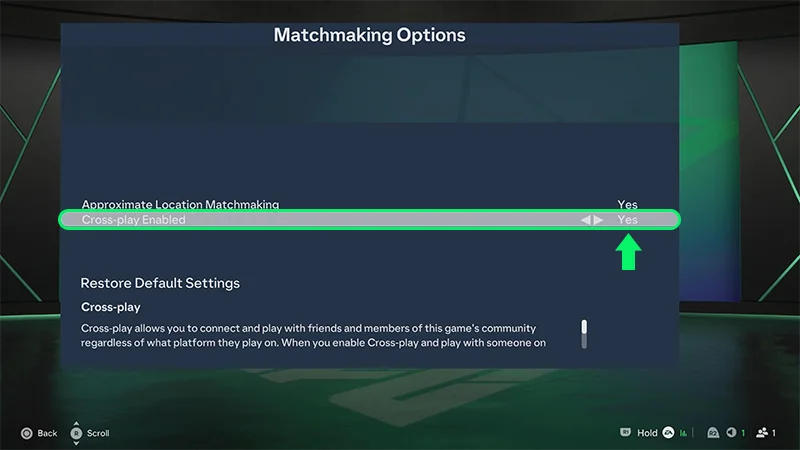
При первом запуске FC кроссплатформенная игра по умолчанию будет включена.Вот как ее отключить или снова включить:- 1В главном меню откройте EA Connect.
- 2Откройте настройки общения.
- 3Выберите Кроссплатформенная игра, затем Настройки кроссплатформенной игры.
- 4В разделе «Кроссплатформенная игра включена» выберите вариант «Нет», чтобы отключить кроссплатформенную игру. Чтобы вновь включить кроссплатформенную игру, выберите вариант «Да».
Присутствует ли общий прогресс в EA SPORTS FC™?
Общий прогресс на PlayStation® возможен только в рамках Ultimate Team™.