Overview
Your Order History is where you'll find info about the transactions on your EA Account, including their status.
How to view your orders and refunds
Check your Order History
You can check your Order History from your EA Account settings. Select the Order History tab to find details of each order, including the order date, number, description, status, and price.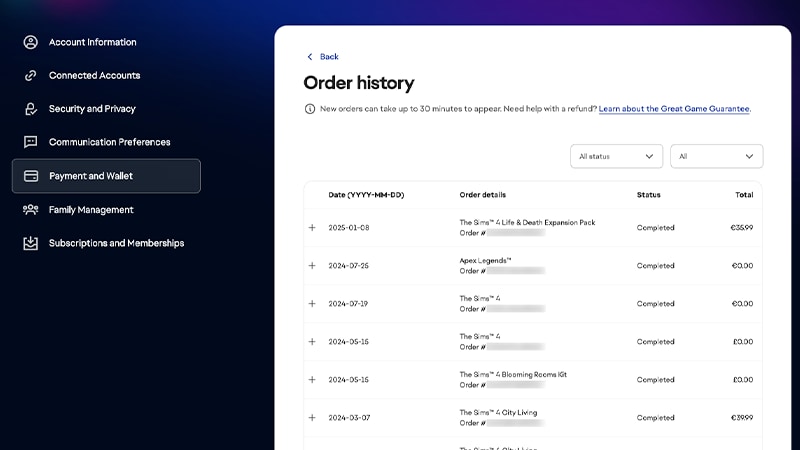
To use the Family Activity Report to view your child or teen’s transaction history, you need to add them to your Family.Here’s how to add your teen to your Family and where to find the report.
Check your order status
You can see your order status in your Order History. Here’s what each status means.- Pre-ordered: the game or item you bought has been pre-ordered. You’ll be charged immediately after placing the pre-order, and you’ll get your content when it’s released.
- You’ll get an email confirming you pre-order and another email when your game comes out.
- Payment pending: you need to complete your payment either offline or through a third-party source, like PayPal.
- Processing: we're processing your payment. Most orders are processed within 24 hours of purchase, but sometimes it may take up to 72 hours to complete.
- Once we finalize your payment, we’ll email you to let you know your content is ready.
- Failed: your payment wasn’t successful. Make sure your billing details are correct in the Payment Methods section of your My Account page, or update your payment info so we can try billing you again.
- Completed: your payment was successful and the content you bought is ready.
- Canceled: your purchase was canceled and won’t be delivered. If you still want to buy this game or item, verify your payment info and try placing your order again.
Check your refund status
You can use our Refund Tool to see the refund status of any game you bought through the EA app.- Completed means your payment provider accepted your refund request.
- Pending means we’re waiting for your payment provider to send us an update.
- Failed means your payment provider denied the refund request, or your payment method no longer exists for the funds to be returned. If you canceled your credit card or closed your payment account before the refund went through, that may be why it failed.