ข้อมูลโดยรวม
เพิ่งเริ่มเล่น Madden NFL Mobile หรือกําลังมองหาวิธีเพิ่มทักษะอยู่ใช่หรือไม่? ดูคําแนะนําของเราเพื่อยกระดับการเล่นเกมของคุณขึ้นอีกขั้น
ก่อนคุณเริ่ม
เชื่อมโยงบัญชี
สิ่งแรกที่คุณจะต้องทําเมื่อเล่น Madden NFL Mobile ก็คือการเชื่อมโยงบัญชีของคุณการเชื่อมโยงบัญชีหมายความว่าคุณสามารถบันทึกความคืบหน้า เล่นข้ามอุปกรณ์ และกู้คืนความคืบหน้าของคุณหากมันสูญหายไปได้ หากคุณเชื่อมโยงบัญชี Madden NFL Mobile อันก่อนหน้าของคุณไว้แล้ว บัญชีของคุณจะยังคงเชื่อมโยงอยู่- 1ในเมนูหลัก ให้แตะฟันเฟืองตรงมุมขวาบนเพื่อเปิด Settings (การตั้งค่า)
- 2เลือก Link ถัดจาก Link Accounts
- 3แตะ Link ที่อยู่ข้างบัญชี EA, Google Play Games, Apple Account หรือ Facebook
วิธีเล่น Madden NFL Mobile
ที่ที่ดีที่สุดในการเรียนรู้เกี่ยวกับ Madden NFL Mobile ก็คือในเกมของคุณ แตะฟันเฟืองแล้วเลื่อนไปยัง Help & Feedback จากนั้นแตะ Support ที่อยู่ติดกับ Customer Support เพื่อเข้าถึงบทความการช่วยเหลือในเกมของเราและดูข้อมูลเพิ่มเติมเกี่ยวกับ Madden NFL Mobile
มีวิธีเล่น Madden NFL Mobile อยู่ 2 วิธีคือ Seasons และ Ultimate Team เมื่อคุณเล่น Ultimate Team คุณสามารถเลือกโหมดย่อยของเกมต่างๆ และรับรางวัลได้
- Seasons: คุณจะได้เล่นตามตารางฟุตบอลครบทั้ง 17 เกมและแข่งขันเพื่อคว้า Lombardi Trophy คุณจะไม่ได้รับรางวัลในโหมด Seasons
- Ultimate Team: คุณสามารถรับรางวัลได้จากการทําชาเลนจ์เสร็จ
- Madden Base: ทําอีเวนต์ให้เสร็จเพื่อรับPlayer, Training Point หรือ Coin ยิ่งเล่นอีเวนต์ก็จะยิ่งท้าทายมากขึ้น แต่คุณก็จะได้รับรางวัลที่ดีขึ้นเมื่อคุณก้าวหน้า
- Journeys: เล่นแผนที่ Journeys ขนาด 30 โหนดเพื่อรับรางวัล อีเวนต์ Journey จะปลดล็อกไปขณะที่คุณเล่น ดังนั้นทําชาเลนจ์ก่อนหน้าให้เสร็จเพื่อปลดล็อกชาเลนจ์ถัดไป
- Arena: แข่งขันกับผู้เล่นอื่นใน Arena เพื่อรับสถานะและรางวัลจากกระดานจัดอันดับ
- Leagues: เล่นร่วมกับเพื่อนๆ เพื่อแข่งกับทีมอื่นใน Leagues แล้วปลดล็อกรางวัลพิเศษผ่านรางวัลความสําเร็จ League
- The Weight Room: แลกเปลี่ยน Coin เพื่อเปิดใช้บูสต์ OVR แบบจํากัดเวลา จากนั้นใช้บูสต์ OVR เหล่านี้เพื่อช่วยให้คุณทําอีเวนต์ที่ท้าทายให้สําเร็จ
Ultimate Team ยังช่วยให้คุณมีส่วนร่วมใน Field Pass และEvent Pass ซึ่งเป็นเส้นทางการพัฒนาการเล่นแบบจํากัดเวลาซึ่งจะมอบเป้าหมายใหม่ การเดินทางที่สามารถเล่นได้ และรางวัลที่มีเอกลักษณ์ Field Pass ยังทําให้คุณสามารถเข้าถึงความคืบหน้า Season Team Training ซึ่งคุณสามารถเพิ่มแรงค์ให้แก่ไลน์อัปแต่ละหมวด (ทีมบุก ทีมป้องกัน และทีมพิเศษ) และกลุ่มตําแหน่งต่างๆ ได้ เช่น ควอเตอร์แบ็ก หรือฮาล์ฟแบ็ก/ฟูลแบ็ก การเพิ่มแรงค์จะมอบโบนัส Overall Rating (OVR) ให้แก่หมวดไลน์อัปและตําแหน่งผู้เล่นแต่ละคน คุณยังสามารถรับรางวัลจากการเพิ่มแรงค์ได้ด้วย การเพิ่มแรงค์ Season Team Training ของคุณจะรีเซ็ตเมื่อ Field Pass ถัดไปออก หากคุณใช้ Season Team Training จนถึงระดับสูงสุด การทำเช่นนั้นจะมีผลต่อ Field Pass ถัดไป
- Field Pass มีแบบเทียร์ Free และ VIP คุณต้องซื้อ VIP Field Pass ด้วยเงินจริง
- Event Pass มีแบบเทียร์ Free, Plus และ Premium เทียร์ Plus และ Premium จะให้รางวัลที่มีคุณภาพสูงกว่า และคุณจะต้องซื้อเทียร์เหล่านี้ด้วยเงินจริง
แตะ My Team จากปุ่มเมนูด้านซ้ายบนเพื่อจัดการไลน์อัปของคุณ คุณจะเห็นผู้เล่นและโค้ชในไลน์อัปเมื่อแตะผู้เล่นในไลน์อัปของคุณ คุณจะเห็นผู้เล่นสำรองบนม้านั่งอยู่ด้านล่างสุดของหน้าจอ แตะแล้วลากผู้เล่นสำรองบนม้านั่งไปยังช่อง Drag & Drop เพื่อแทนที่ผู้เล่นที่เล่นอยู่
- ดูผู้เล่นของคุณตามแท็บ Offense, Defense และ Special
- แตะ View Items ที่ด้านขวาบนเพื่อดู Players, Items, Wallet และ Unclaimed Items ของคุณ
อยากได้ผู้เล่นมากพรสวรรค์รายใหม่ๆ ในทีมของคุณใช่ไหม? ใช้ Madden Cash, Coin และ Gems เพื่อรับแพ็กหรือผู้เล่นจาก Store คุณสามารถซื้อได้ที่ Storeในเกม หรือรับไอเท็มที่ Madden NFL Mobile Web Storeร้านค้าในเกมมี Core Store และFeatured Store ซึ่งคุณสามารถดูข้อเสนอใหม่ๆ ได้คุณยังสามารถแลกเปลี่ยนเงินกับผู้เล่นโดยใช้ Item Exchange ได้ด้วย
- สามารถใช้ Madden Cash เพื่อรับแพ็ก คอนเทนต์พรีเมียม และ Bundle จาก Store ได้ คุณต้องซื้อด้วยเงินจริง
- สามารถใช้ Coin และ Gem เพื่อรับแพ็กและผู้เล่นได้ คุณจะได้รับ Coin และ Gem จากการเล่น
Playbooks
Playbook คือตัวกําหนดประเภทการเล่นที่คุณสามารถใช้ได้ในสนาม สไตล์การเล่นแต่ละแบบจะมีชุดการเล่นเริ่มต้น คุณจะมีสิทธิ์เข้าถึง Playbook และงบประมาณสําหรับ Playbook ที่ขยายเพิ่ม—Playbooks จะไม่ผูกติดกับโค้ชอีกต่อไป การเล่นแต่ละครั้งมีค่าใช้จ่าย และค่าใช้จ่ายทั้งหมดของคุณต้องอยู่ภายในงบประมาณ Playbook ของคุณ งบประมาณ Playbook ของคุณจะเพิ่มขึ้นเมื่อเลเวล User ของคุณเพิ่มขึ้น คุณจะเห็น Playbook Budget ของคุณอยู่ที่ใต้แท็บ Playbook ตัวเลขที่มุมซ้ายบนของแต่ละเพลย์คือค่าที่ต้องใช้สำหรับการเล่นเพลย์นั้นๆ ในเมนูด้านซ้ายมือ คุณจะสามารถกรองการเล่นได้ดังนี้- Favorites
- Run
- Short Pass
- Long Pass
- Spread
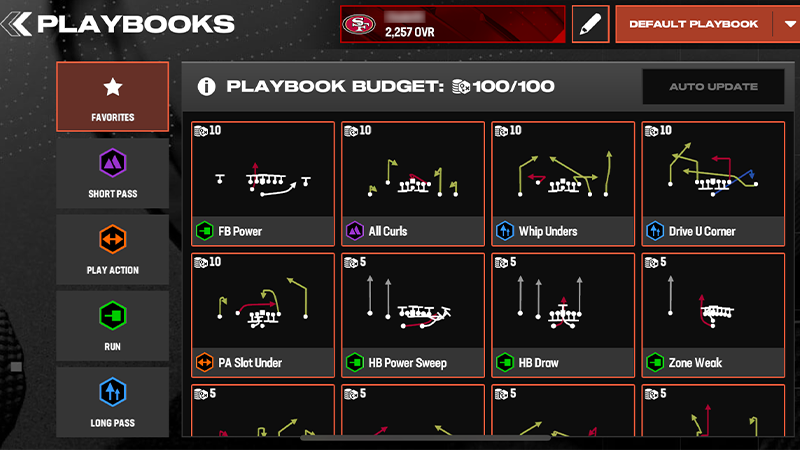
ที่ที่ดีที่สุดในการขอความช่วยเหลือก็คือในเกมของคุณ แตะฟันเฟือง แล้วเลื่อนไปยัง Help & Feedback จากนั้นแตะ Support ที่อยู่ติดกับ Customer Support เพื่อดูบทความของเราและขอความช่วยเหลือเกี่ยวกับคอนเทนต์ที่หายไปหากคุณรู้ User ID ของคุณ ให้แตะ Contact Us ในส่วนล่างสุดของหน้าเว็บไซต์ เราจําเป็นต้องใช้ User ID ของคุณเพื่อช่วยคุณ