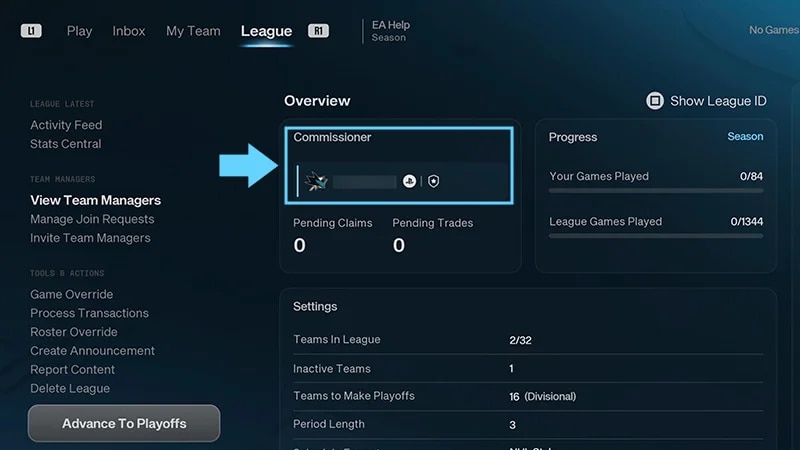
A Commissioner in NHL 27 manages a Connected Franchise League and has more control and influence than Managers.
What can I do as a Commissioner?
From the League tab, you can:
invite Team Managers and handle join requests
create announcements for your League
approve trades and process free agent claims
move players across League rosters
override game results
swap Managers between teams
advance your League through season phases
delete your League.
Some Commissioner tools are only available during specific League phases.
How do I create and set up a League?
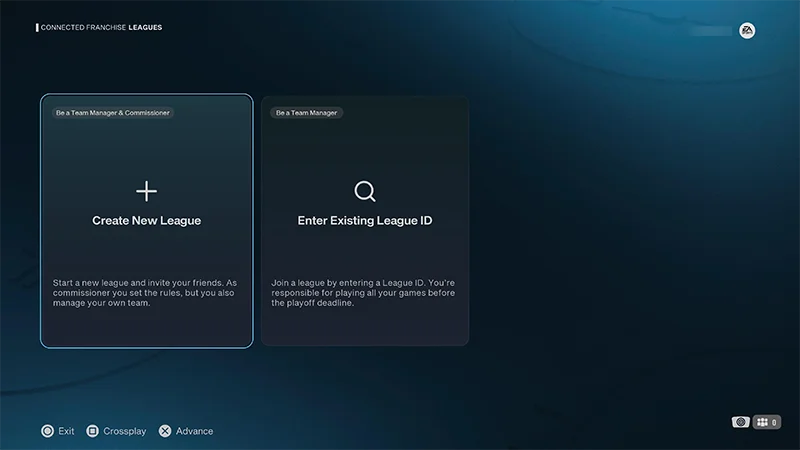
You can create and set up a Connected Franchise League from the Create New League screen.
1
Go to Connected Franchise and select Create New League.
2
Choose your roster: EA Roster, Custom Roster, or Roster Sharing.
3
Enter your League name.
4
Customize your League Settings (teams, schedule, salary cap, playoff qualification, and gameplay sliders).
5
Select your team and manage your Team Select options.
You can change division, conference alignments, or swap teams.
6
Go to League Overview to review your League settings and adjust gameplay rules and sliders.
Check your League settings before you create your League. Some settings can’t be changed after your League has been finalized and created, but you can adjust gameplay rules and sliders during the:
Pre League
Regular Season
Playoffs
Offseason.
How do I oversee Managers in my League?
You can invite players, review join requests, and manage existing Managers from the League tab.
ชวนเพื่อน
ชวนเพื่อน
จัดการคำขอเข้าร่วม
จัดการคำขอเข้าร่วม
จัดการ Team Manager
จัดการ Team Manager
หลังจากที่คุณสร้าง League แรกของคุณแล้ว คุณสามารถเชิญเพื่อนให้เข้าร่วมในฐานะ Manager ได้
1
เลือก Invite Now เพื่อเชิญเพื่อน
2
เลือกเพื่อนที่คุณต้องการเชิญให้เข้าร่วม League ของคุณ
รายชื่อเพื่อนของคุณอ้างอิงจากเพื่อน EA ของคุณ
เมื่อคุณส่งคำเชิญให้เพื่อนแล้ว จะมีคำว่า Invite Sent ปรากฏข้างชื่อของพวกเขา ฉันจะชวนเพื่อนภายหลังได้อย่างไร?
1
ไปที่แท็บ League
2
เลือก Invite Team Managers จากด้านซ้ายของหน้าจอของคุณ
3
เลือกเพื่อนที่คุณต้องการเชิญ
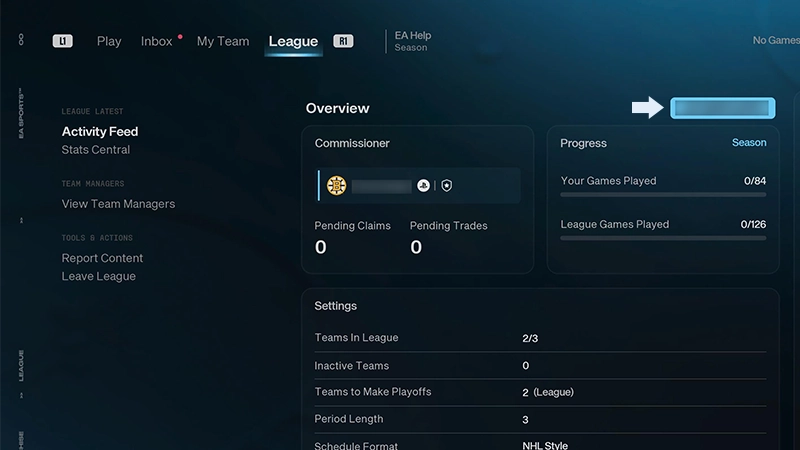
ฉันสามารถดู League ID ของฉันได้ที่ไหน?ผู้เล่นสามารถเข้าร่วม League ของคุณได้เช่นกัน หากคุณแชร์รหัสเฉพาะประจำ League ของคุณแก่พวกเขา หากต้องการค้นหา:
ใช้ View Team Managers จากแท็บ League ใน Connected Franchise เพื่อตรวจสอบว่าใครเข้าร่วม League ของคุณและจัดการทีมของพวกเขา จาก League Managers คุณสามารถ...
คุณสามารถใช้การประกาศเพื่อแชร์ข้อมูลแก่ทุกคนใน League ของคุณได้ไปที่แท็บ League แล้วเลือก Create Announcement เพื่อเขียนประกาศ ประกาศใหม่จะแชร์ผ่านทาง Activity Feed ของ League ของคุณและ Inboxประกาศมีประโยชน์สําหรับแจ้งเรื่องต่างๆ เช่น การอัปเดต League, กําหนดเวลาหมดเขตที่กําลังจะมาถึง, การแข่งขัน หรือการแจ้งเตือนธุรกรรมต่างๆ
How do I process trades and free agent claims?
As a Commissioner, you can approve accepted trades, process free agent claims, or process both at once from Process Transactions. No trade goes through without your stamp of approval. When free agency heats up, you can step in to process blind Free Agent bidding for the entire League.
การเทรดแลกเปลี่ยน
การเทรดแลกเปลี่ยน
คำขอผู้เล่นอิสระ
คำขอผู้เล่นอิสระ
1
เปิดแท็บ League
2
ไปที่ Tools & Actions แล้วเลือก Process Transactions
คุณจะจัดการช่วงต่างๆ ของฤดูกาลแข่งได้จากแท็บ League ใน Connected Franchise ที่นี่ คุณสามารถเลื่อน League สู่ขั้นถัดไป หรือเตรียมพร้อมสำหรับฤดูกาลต่อไปได้ในช่วง Offseason คุณต้องมี Manager อื่นอย่างน้อยหนึ่งคนใน League ของคุณก่อนที่คุณจะสามารถเข้าสู่ Regular Season เมื่อคุณพร้อมที่จะออกจาก Pre League ให้เลือก Start Regular Season
ช่วงต่างๆ ของฤดูกาลแข่งมีอะไรบ้าง?
Pre-League
เชิญ Manager และปรับกฎต่างๆ ก่อนเริ่ม Regular Season ของคุณ
คุณไม่สามารถแข่งได้ในช่วงนี้
คุณต้องมี Manager อย่างน้อยสองคนใน League เพื่อเข้าสู่ช่วงถัดไป
Regular Season
เล่นเกม ทำการเทรด และดำเนินการคำขอผู้เล่นอิสระ
การเริ่ม Regular Season จะล็อกการตั้งค่า League บางอย่าง รวมถึงรูปแบบเพลย์ออฟและขีดจำกัดเพดานเงินเดือน
ปรับการตั้งค่า League รวมถึงการลดขนาดทีม การเปลี่ยนรูปแบบตารางการแข่งขัน และการปรับโครงสร้างเพลย์ออฟ
เปลี่ยนจาก Offseason เข้าสู่การเริ่ม Regular Season ถัดไป
เมื่อคุณเลื่อน League ของคุณเข้าสู่ฤดูกาลใหม่ บัญชีรายชื่อที่มีอยู่, Manager, ID League และการตั้งค่าต่างๆ จะยังคงอยู่ Manager ที่มีอยู่แล้วของคุณจะยังรักษาทีมของตนไว้ และคําขอเข้าร่วมที่รอดําเนินการและการเชิญร่วม League ยังคงใช้งานได้อยู่
คุณสามารถทําให้ขนาด League ของคุณเล็กลงได้เท่านั้น หากคุณลดขนาด League ของคุณ จะไม่สามารถเพิ่มขนาดได้ในปีถัดไป
หาก League ถูกลบ ผู้เล่นทั้งหมดจาก League นั้นจะเข้าสู่สถานะผู้เล่นอิสระโดยอัตโนมัติเมื่อคุณเข้าสู่ Regular Season ใหม่
ฉันจะลบ Connected Franchise League ของฉันได้อย่างไร?
การลบ League จะลบ League นั้นอย่างถาวรสําหรับทุกคนใน League
คุณสามารถลบ Connected Franchise League ได้จากแท็บ League โดยการเลือก Delete Leagueระบบจะขอให้คุณยืนยันก่อนที่ League จะถูกลบ ตรวจสอบให้แน่ใจว่าคุณกําลังลบ League ที่ถูกต้องก่อนดําเนินการต่อ