概觀
《戰地風雲 6》有六種主要載具類型:防空、直升機、噴射機、坦克及地面攻擊載具、運輸載具和水上載具。使用它們來投入戰鬥、運送士兵、防禦目標並掩護步兵。請參閱本指南以了解控制方式、訣竅以及入門協助。
《戰地風雲 6》中有哪些載具?
《戰地風雲 6》有六種主要載具類型:防空、直升機、噴射機、坦克及地面攻擊載具、運輸載具和海軍載具。每種載具類型都有不同的用途和特色,例如座位數量、武器和涵蓋範圍。防空載具讓你能從地面反制並與空中載具交戰。使用它們來防禦陣地和目標,對抗來襲的敵方飛彈和飛行器。
直升機是你的空中後援。使用它從上方攻擊步兵和載具,更快速把部隊部署到新地點,或為小隊提供補給。 雖然直升機擁有速度優勢,但也容易遭到坦克、防空載具、噴射機與其他飛行器的攻擊。建議帶上一名砲手以增強火力。我們與世界各地的玩家攜手合作,分享《戰地風雲 6》的技巧與訣竅。查看此 YouTube 指南來瞭解更多有關使用直升機的資訊。
- 攻擊直升機有兩個座位。使用它攻擊步兵和其他地面目標。
- 運輸直升機有五個座位,包含一個使用直升機迷你砲機槍的砲手座位。運輸直升機的主要用途是重新安置士兵。
噴射機是空戰的理想選擇。擊落敵機並摧毀地面目標來支援小隊,進而主宰戰場。 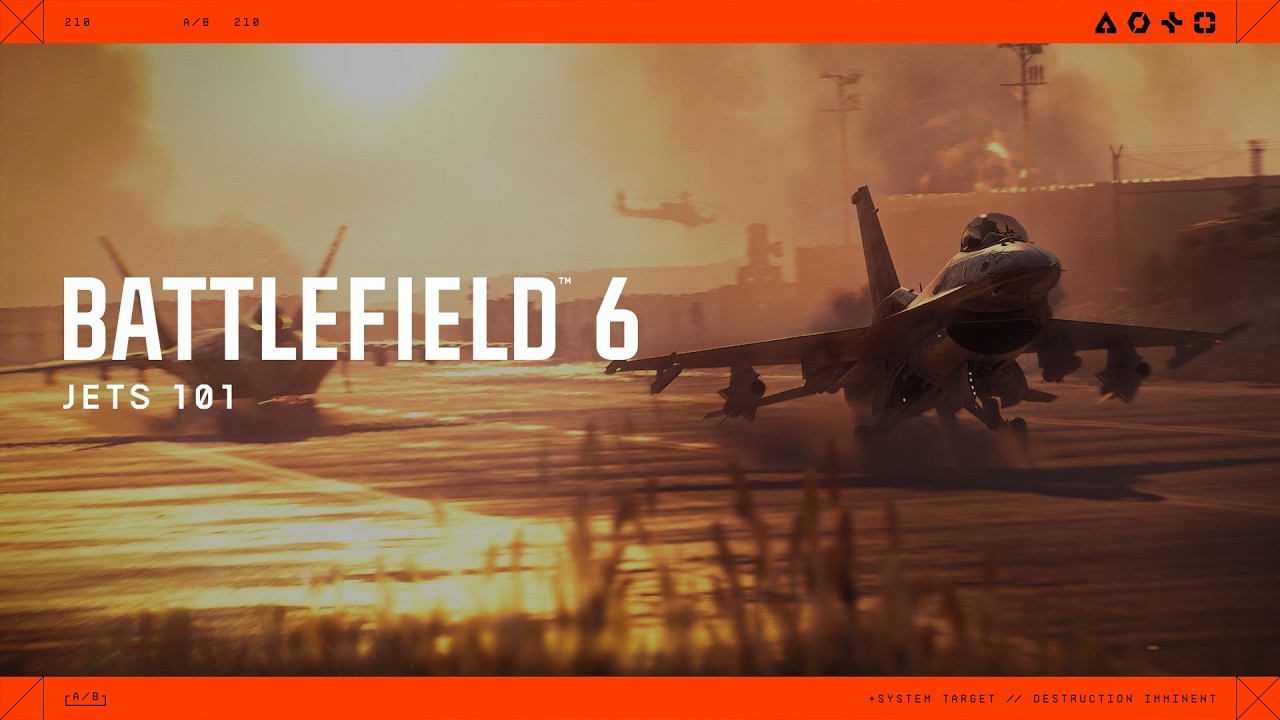 對戰開始後,噴射機需等待 60 秒才會生成。噴射機大多會生成在總部跑道上,但在部分地圖中,它們會直接在空中生成,必須透過部署畫面才能駕駛。噴射機可以有一個或兩個座位。賽季 4 推出兩種全新噴射機:專精空對空作戰的 F-74A Seacat,以及適合空戰與空對地作戰的 F/A-81F Super Spectre。 請前往 ea.com 深入瞭解賽季 4 的新噴射機。
- 攻擊噴射機用於地面攻擊,適合對付載具、關鍵目標與步兵。
- 戰鬥噴射機用於確保制空權和摧毀敵方飛行器。
坦克是能夠在地圖上橫衝直撞的強大裝甲載具。利用它摧毀建築物,讓敵軍失去掩體,並保護我方士兵免受遠程攻擊。坦克會在部署基地或已佔領的目標點生成。
- 主戰坦克是重裝甲且強大的載具,有兩個座位。使用它來摧毀敵方載具。
- 步兵戰鬥車比較輕且有六個座位。使用它解決步兵並重新部署士兵。
運輸載具能讓步兵在地圖上快速移動。這是最輕型的載具,可用來把步兵部署到新區域或包抄敵人。駕駛運輸載具時記得留意敵人,因為它的防護力較弱。
《戰地風雲 6》有兩種海軍載具:RCB-90 巡邏艇以及 7.7M NSW 硬式橡皮艇輕型運輸艇。在我們的海戰載具指南中,深入了解海戰的運作方式。
我要如何進出載具?
本指南針對所有載具皆使用預設設定。
- 1接近載具。
- 2在 PC 上按下 E,或在控制器上使用 正方按鈕或 X 以 進入。
- 你可以從隊伍總部選擇直接部署至載具之中。選取一台可用的載具進入。
- 若有其他玩家正在戰場上使用載具,你也可以選擇部署至該載具中。你將會被安置到可用的座位上。
- 1在 PC 上按住 E 或者在控制器上使用 正方按鈕 或 X
- 2你將會從你看向的那一側 離開 載具。
如果你在離開載具時遇到問題: 如果你完全無法離開載具,你也應該檢查:
- 1前往 設定 > 遊戲方式 > 步兵。
- 2檢查你的 互動與重新裝填設定。這讓你能選擇按住時是互動還是重新裝填,讓你能選擇偏好的輸入方式。
- Portal 伺服器規則,如果你是在 Portal 伺服器中遊玩
- 遊戲內是否有任何已知錯誤。
- 如果你認為遇到了錯誤,請嘗試測試發生錯誤的特定條件。例如,錯誤是否僅在使用滑鼠與鍵盤時發生,或是在你進入載具時發生。
如何在《戰地風雲 6》中使用坦克?
坦克是地面戰鬥的關鍵。使用它來掩護步兵、摧毀建築物,並切斷重要路線。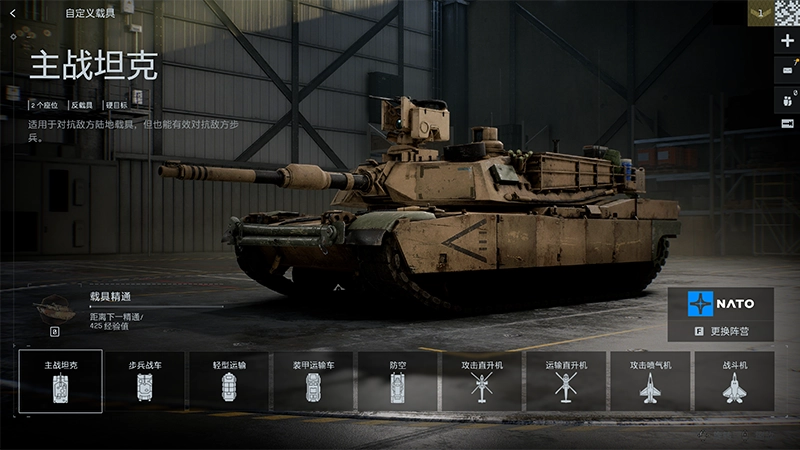
如果你使用控制器,你可以使用 左操作桿來操控坦克。 在 PC 上,使用這些控制方式來引導你的載具。
如果你不能進入坦克,有些特定的坦克可讓你攀附在後方。你也可以把士兵或補給品放在坦克頂部來移動他們。 記得在交戰的空檔用工程師修理坦克,以免載具遭到摧毀。
| Column 1 | Column 2 | ||
|---|---|---|---|
| 行動 | PC | ||
| 加速 | W | ||
| 煞車或倒車 | S | ||
| 左轉 | A | ||
| 右轉 | D |
| Column 1 | Column 2 | Column 3 | |||
|---|---|---|---|---|---|
| 行動 | PC | 控制器 | |||
| 加速 | 左 Shift 鍵 | 按下左操作桿 | |||
| 手剎車 | Z | B 或圓圈按鈕 |
擔任駕駛時,你將控制坦克的方向並使用武器進行攻擊。
駕駛時,你可以在第一人稱與第三人稱視角之間切換。在 PC 上按 C 鍵或在控制器上按的右操作桿可切換視角。
| Column 1 | Column 2 | Column 3 | |||
|---|---|---|---|---|---|
| 行動 | PC | 控制器 | |||
| 瞄準載具武器 | 方向鍵 | 右操作桿 | |||
| 發射載具武器 | 空白鍵或點擊滑鼠左鍵 | RT/R2 | |||
| 縮放 | 點擊滑鼠右鍵 | LT/L2 | |||
| 切換武器 | F 或向上滾動滑鼠中鍵 | Y 或三角按鈕 | |||
| 鎖定你的砲塔 | V | 方向鍵下 |
- 第三人稱適合在地圖上移動與觀察周遭路況。
- 第一人稱較適合進行戰鬥。
擔任砲手時,你將使用搭載武器來殺死敵方士兵。
- 若要變更座位,請按下控制器上的 A或 X。
- 如果你在 PC 上遊玩,F1、F2、F3,等等代表你選擇的座位,F1是載具的一號位。
- 使用 空白鍵 或點擊滑鼠 左鍵 來開火,或者在控制器上使用 RT/R2。
若想了解扮演砲手的訣竅,請查看這篇 EA Forums 上的砲手指南。
我要如何在《戰地風雲 6》中飛行?
飛行是一項平衡操控飛機機頭位置、油門以及移動方向的過程。 飛行速度越快,就越難控制飛行器。試著保持水平並留意你的速度。 以下是預設飛行控制指南。油門用於控制飛行器的升降。
| Column 1 | Column 2 | Column 3 | |||
|---|---|---|---|---|---|
| 行動 | PC | 控制器 | |||
| 加速 | W | 左操作桿向上 | |||
| 減速 | S | 左操作桿向下 |
要讓噴射機起飛,你需要加快速度。使用你的助燃器(Shift 鍵 或按下 左操作桿)可以幫助你加速。
將機鼻向上或向下傾斜會改變你的方向。
請注意:當機頭向下傾斜時,你會失去一些高度。透過加速來抵消此影響。
| Column 1 | Column 2 | Column 3 | |||
|---|---|---|---|---|---|
| 行動 | PC | 控制器 | |||
| 向下俯仰:前進 | 下方向鍵 | 右操作桿向上 | |||
| 向上俯仰:後退 | 下方向鍵 | 右操作桿向下 |
偏航會使飛機機頭向左或向右移動。
| Column 1 | Column 2 | Column 3 | |||
|---|---|---|---|---|---|
| 行動 | PC | 控制器 | |||
| 向左偏航 | A | 左操作桿向左 | |||
| 向右偏航 | D | 左操作桿向右 |
滾轉會使你的飛機向左或向右傾斜。
| Column 1 | Column 2 | Column 3 | |||
|---|---|---|---|---|---|
| 行動 | PC | 控制器 | |||
| 向左滾轉 | 左方向鍵 | 右操作桿向左 | |||
| 向右滾轉 | 右方向鍵 | 右操作桿向右 |
是的,你可以在大多數飛機中變更視角。在部分載具中,駕駛員將始終使用面向前方的駕駛艙視角。
自由視角讓你能夠圍繞你的載具移動第三人稱視角。
| Column 1 | Column 2 | Column 3 | |||
|---|---|---|---|---|---|
| 行動 | PC | 控制器 | |||
| 在第一人稱與第三人稱視角之間切換 | C | 按下右操作桿 | |||
| 啟用自由觀看 | V | 方向鍵下 |
該如何讓飛行更加輕鬆?
噴射機和直升機都有簡化控制,你可以使用它們讓飛行更輕鬆。以下說明如何找到並使用它們。若要開啟簡化飛行控制: 當你使用簡化控制時,你的飛行器將會依循鏡頭的方向移動。舉例來說,當你把鏡頭朝上,你的載具就會向上移動。除了俯仰、偏航與翻滾會自動控制外,飛行器的其他移動都由你操控。
請注意:你也可以朝這些方向移動滑鼠,而不是使用方向鍵。前往 ea.com 取得飛行秘訣並深入了解空中載具控制。
- 1前往 遊戲設定 選單,並捲動至 載具。
- 2請確保 飛機控制輔助 和 直升機控制輔助 已 開啟。
- 飛機控制適用於噴射機,直升機控制則適用於直升機。
- 你可以針對一種飛行器使用簡化控制,而不對另一種使用。
| Column 1 | Column 2 | Column 3 | |||
|---|---|---|---|---|---|
| 行動 | PC | 控制器 | |||
| 上 | 下方向鍵 | 右操作桿向上 | |||
| 下 | 下方向鍵 | 右操作桿向下 | |||
| 左 | 左方向鍵 | 左操作桿向上 | |||
| 右 | 右方向鍵 | 左操作桿向下 |
我該如何在《戰地風雲 6》中使用噴射機和直升機?
玩家可在《戰地風雲 6》中使用噴射機和直升機進行空對空和空對地作戰。使用空中載具支援地面部隊、鎖定關鍵目標並稱霸天空。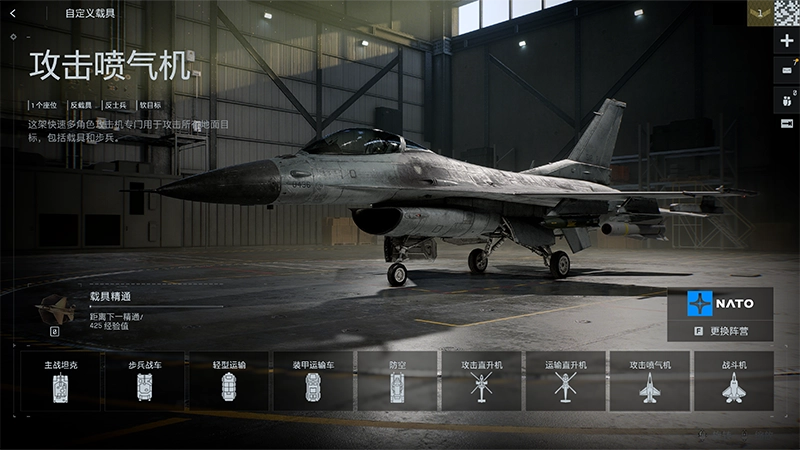
在飛行器上開火的預設控制是 PC 上的 空白鍵或滑鼠右鍵,或控制器上的 RT/R2。如要切換飛行器的武器,在 PC 可按下 F 或向上滾動滑鼠中鍵,或按下控制器的 Y/三角。若要重新裝彈,請在 PC 上按 R,或按 正方按鈕 / X。部分飛機也配置了砲手座位,控制方式和坦克砲手座位相同。
- 要更改座位,在你的控制器上按 A或 X。
- 如果你在 PC 上遊玩,F1、F2、F3, 等等代表你選擇的座位,F1 是載具的一號位。
- 使用 空白鍵 或點擊滑鼠 左鍵 來開火,或者在控制器上使用 RT/R2。
如果你是空戰新手,以下是空中纏鬥、掃射以及使用載具飛彈的基本知識。
- 纏鬥指的是與其他飛行器進行戰鬥。擊落敵方飛行器是你的首要目標。
- 如果你在噴射機裡,試著壓制直升機,因為它們會造成大量傷害。
- 掃射是高速貼地飛行並攻擊地面目標的戰術。請在不危及載具的前提下,盡可能延長對敵軍的開火時間。
- 使用飛彈鎖定並摧毀地面目標。由於每次只能發射一枚飛彈,請優先瞄準坦克、建築物或隊友急需支援的區域,以發揮最大破壞力。
若你的飛行器遭到鎖定,螢幕上會出現通知。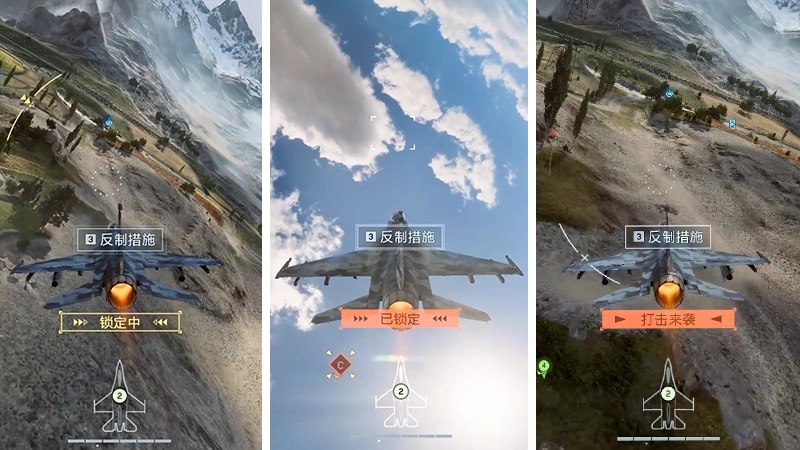
- 鎖定會最先出現。
- 當你被鎖定時,會出現 已鎖定。
- 當射彈飛向你的飛行器時會出現來襲。
- 低空飛行較難被鎖定,因為雷達偵測不到你。但是,你會更容易受到其他類型的攻擊或墜毀。
- 你可以使用助燃器來提升速度。
- 在 PC 上按 Shift 或在控制器上的 左操作桿 以使用助燃器。
- 避免直線飛行,或試著利用地圖的地形阻擋來襲的射彈。
我要如何變更我的載具設定?
你可以在 設定選單中找到 載具、飛行器、砲手、運輸與 直升機的控制,你可以在此調整控制的輸入靈敏度。- 選擇控制器或滑鼠與鍵盤查看目前的設置,為每種不同類型選擇不同的預設配置或按鍵綁定。
- 如果你使用控制器遊玩,你可以選擇 預設、替代和 左手設定。如果你使用滑鼠與鍵盤遊玩,你可以選擇自己的按鍵配置。
你可以在設定 > 遊戲內容中變更關鍵載具設定。最適合你的設定取決於個人喜好。如果你不確定要變更哪些內容,我們建議從這些設定開始作為你的基準。載具
瞄準輔助
如需調整設定的更多協助,請查看我們的 PC 與控制器設定指南。
| Column 1 | Column 2 | ||
|---|---|---|---|
| 設定名稱 | 建議設定 | ||
| 載具瞄準靈敏度 | 30 - 50 | ||
| 載具滑鼠瞄準靈敏度 | 20 - 40 | ||
| 飛機控制靈敏度 | 100 | ||
| 直升機控制靈敏度 | 100 |
| Column 1 | Column 2 | ||
|---|---|---|---|
| 設定名稱 | 建議設定 | ||
| 載具瞄準輔助縮放鎖定 | 100 | ||
| 載具瞄準輸入曲線 | 如果你以前玩過《戰地風雲》系列遊戲,請選擇一款你喜歡其操作方式的遊戲。 | ||
| 載具瞄準輔助 | 100 | ||
| 載具縮放瞄準輸入曲線 | 如果你以前玩過《戰地風雲》系列遊戲,請選擇一款你喜歡其操作方式的遊戲。 | ||
| 載具瞄準協助減速 | 100 |
載具進度在《戰地風雲 6》中如何運作?
你可以在《戰地風雲 6》中獲得載具經驗值。當你獲得特定載具的經驗值時,你將為其解鎖更多內容,例如外觀、迷彩與武器。 你可以透過在遊戲中使用特定載具並執行特定動作來獲得經驗值,例如使用載具及其配備、使用載具完成目標,以及達成擊殺與助攻。你也可以啟用設備加成來為武器與載具獲得更多經驗值。你可以在裝備配置 > 載具查看載具進度。選擇你想查看的載具類型,然後選擇特定載具以查看其 載具專精。 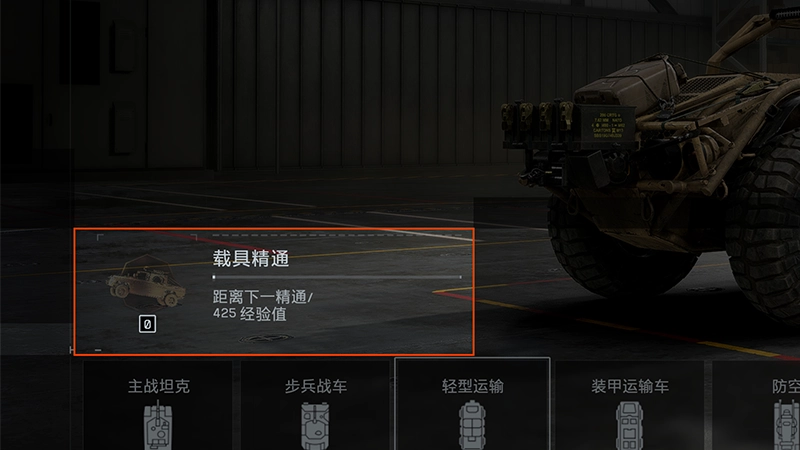
我該如何自訂載具?
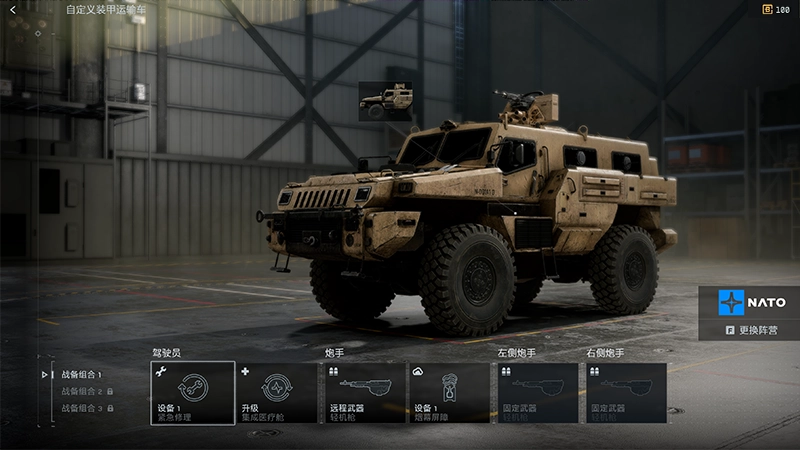
- 1移至 裝備,然後 載具。
- 2選擇你要檢視的載具類型。
- 3選擇一輛特定載具來進行變更。
- 4選擇武器與配備類型,例如主要或配備 1,以查看可用項目並選擇你想配備的內容。
- 5選擇載具圖像即可查看你的 外觀自訂 並變更配備內容。
為何我無法使用載具?
某些 Portal 伺服器的規則可能會停用部分或所有載具,或變更其在遊戲中的使用方式。 在加入 Portal 伺服器之前,請選擇 體驗資訊 以了解該伺服器的特定規則。 如果地圖上有可用的載具,每個隊伍都可以部署有限數量的此類載具。每輛載具都有重生計時器。如果載具在計時器到期後仍無法使用,則該載具可能仍在被使用中,且只有在被摧毀後才會再次可用。如果你認為遇到了與載具有關的遊戲內錯誤,可以在 EA Forums 取得協助。 在發文之前,請務必先在論壇中搜尋你的問題——可能已經有解決方案或正在討論的主題。了解如何在 EA Forums 回報錯誤。