概觀
初次遊玩《Star Wars 零號連隊™》時,你會在角色創建過程中自訂霍克斯。首先,選擇一個起源,然後自訂霍克斯的外觀、服裝,並選擇他的專精和武器類型。請照本指南中的步驟操作,瞭解你可以在每個類別中選擇哪些選項,以及如何做出適合你偏好遊戲風格的選擇。解鎖巢穴後,還能改動更多自訂選項。
《Star Wars 零號連隊™》中的霍克斯是誰?
霍克斯是你在《Star Wars 零號連隊™》中扮演的主角。你扮演前共和國軍官霍克斯,僱用並率領來自銀河系各處的非正規專業特務,組成零號連隊。 開始新戰役時,你將自訂霍克斯,建立一個符合你偏好遊戲風格的角色。本指南將帶你了解霍克斯可用的自訂選項,以及如何逐步完成角色建立過程。1. 選擇起源
第一步是為霍克斯選擇一個起源。這決定了霍克斯屬於哪個物種,以及可使用的自訂外觀選項。 查看每個可用的起源,進一步了解其物種和背景,然後選擇與你想要建立的角色最相符的選項。| Column 1 | Column 2 | ||
|---|---|---|---|
| 物種 | 描述 | ||
| 人類 | 人類是銀河系中最普遍的智慧物種。在無數的星球上都有他們的蹤影,因此難以斷定他們最初的故鄉究竟是哪個星球。 | ||
| 迪維朗族 | 迪維朗族來自叢林星球迪維朗星。他們以額頭上的獨特頭角或突起而聞名。 | ||
| 米里爾族 | 米里爾族來自沙漠行星米里爾星。他們以臉上的傳統幾何圖案刺青而聞名。 | ||
| 托格魯塔族 | 托格魯塔族源自於汐里星。可藉由頭骨上的兩根頭角和三條列庫來認出他們。 | ||
| 泰勒克族 | 泰勒克族原為瑞羅斯星邊境星域的原住民。他們是銀河系中最常見的物種之一,以其獨特的列庫頭尾而聞名。 | ||
| 扎布拉克 | 扎布拉克族來自伊里多尼亞星,但在達索米爾星也有他們的身影。可以藉由顱角來認出他們。 |
2. 選擇預設
為霍克斯選擇起源後,選擇繼續以選取預設選項。預設是現成的角色,可為你在自訂角色時提供起始點。選擇兩個預設之一,或選擇空欄位以建立自訂預設。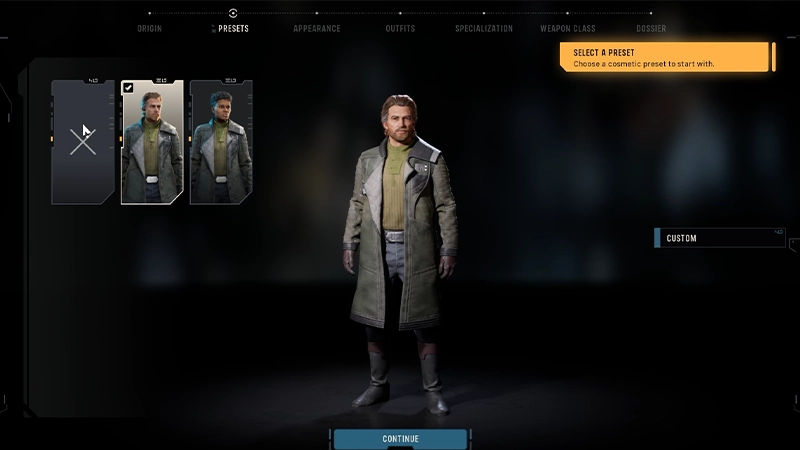
3. 自訂外觀
以下外觀自訂選項適用於《Star Wars 零號連隊™》中霍克斯的人類預設起源。 如果選取其他起源,自訂選項可能會有所不同。 例如:
- 迪維朗族有角類別,但沒有髮型選項。
- 米里爾族沒有鬍鬚選項。
- 托格魯塔族有列庫類別,但沒有頭髮類別或眉毛、雀斑、白斑、刺青、眼影、眼線選項。
- 泰勒克族有列庫類別,但沒有頭髮類別
- 扎布拉克族有角類別,但沒有頭髮類別或白斑選項。
Body
臉部
臉部細節
頭髮
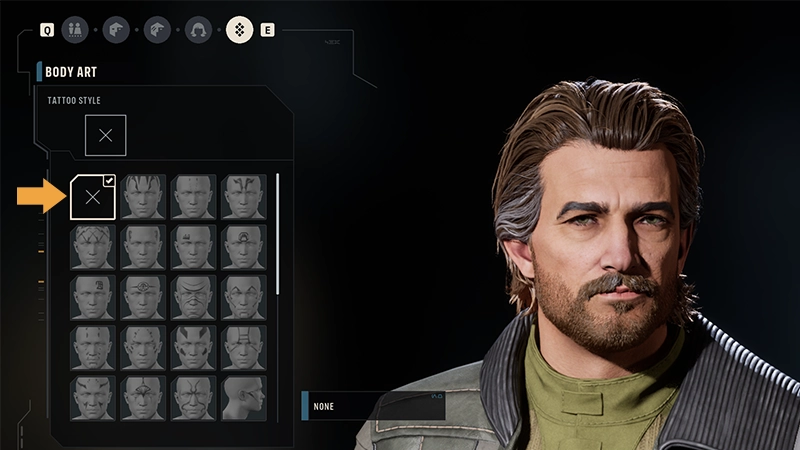
身體彩繪
- 為霍克斯選擇體型。
- 霍克斯身體的特定要素,例如身高、身材和形狀,都會受到你選擇的起源所影響。
4. 選擇你的服裝
以下服裝自訂選項適用於《Star Wars 零號連隊™》中霍克斯的人類預設起源。 如果選取其他起源,自訂選項可能會有所不同。
- 頭飾
- 為霍克斯選擇帽子、頭盔或頭飾。
- 上衣
- 為霍克斯選擇上衣或服裝。
- 臂裝
- 為霍克斯選擇手套。
- 下著
- 為霍克斯選擇褲子或褲裝。
- 靴子
- 為霍克斯選擇一些靴子。
如何選擇和自訂霍克斯的服裝?
- 1選擇頭飾、上衣、臂裝、下著或靴子縮圖。
- 2捲動瀏覽可用樣式,然後選擇一種以裝備。
- 3選擇顏色縮圖以自訂顏色。
你必須為霍克斯配備上衣、下著和靴子物品,但頭飾和臂裝是可選的。如果你不想讓霍克斯穿戴頭飾:如果你不想讓霍克斯穿戴手套:你還可以選擇隱藏裝備的頭飾,這樣當霍克斯與其他角色對話時,就會隱藏頭飾。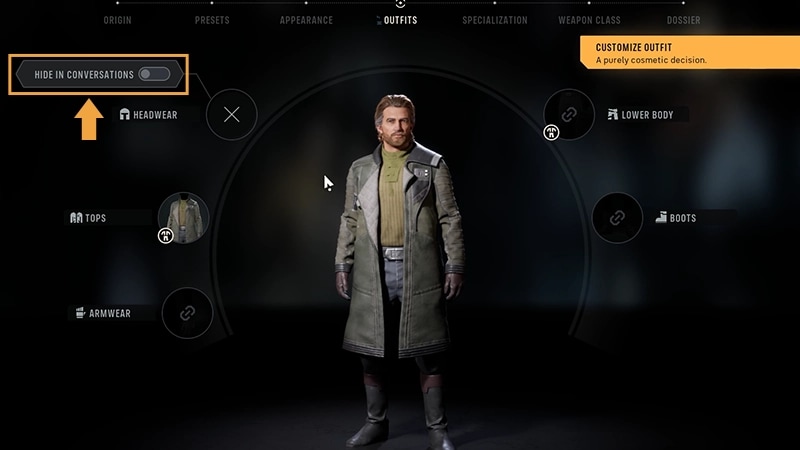
- 前往頭飾
- 選擇帶有 X 圖示的空白縮圖。
- 前往臂裝
- 選擇顯示未配備臂裝的手臂縮圖。
- 1前往服裝畫面。
- 2在頭飾上方,你會找到在對話中隱藏選項。
- 3啟用選項。
某些服裝類別物品有多個欄位,將多個服裝類別中的服裝物品組合成單一樣式外觀。這代表如果你選擇多欄位服裝,它將自動取代你在其他服裝類別中可做的選擇。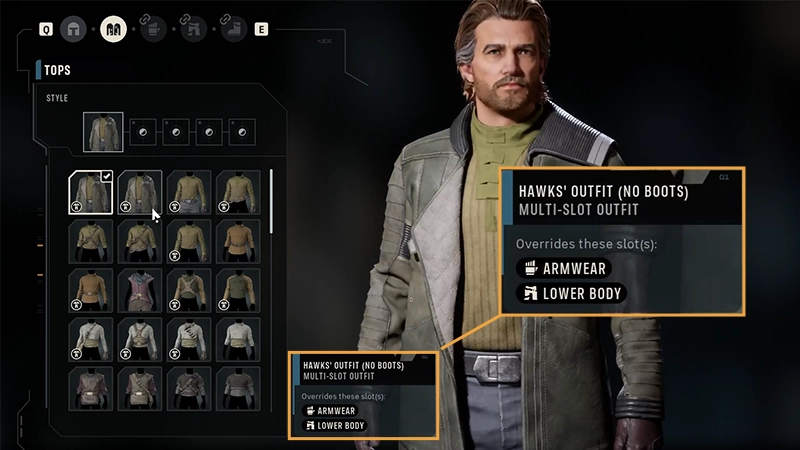
5. 選擇專精
想了解更多關於《Star Wars 零號連隊™》的專精系統嗎? 查看我們的指南,詳細了解專精附帶的能力,以及選擇專精的提示。
《Star Wars 零號連隊™》的能力是如何運作的?
每個專精都有一套獨特的能力。這包括一項終極能力、一項標準能力,以及至少兩項被動能力(取決於你選擇的專精)。- 終極能力
- 這是你最強大的能力。
- 這些能力會對戰鬥產生重大影響,最好在恰當時機使用。
- 標準能力
- 這是你可以在戰鬥中使用的主動能力,用來攻擊敵人、支援盟友或獲得戰術優勢。
- 被動能力
- 這些是始終有效的能力。
- 被動能力提供的加成或效果會在戰鬥中自動套用,無需啟動。
我可以從哪些專精中選擇?
突擊兵是專精於前線戰鬥的角色,擅長在戰鬥中保持機動性。擁有此專精的特務能解決中近距離的敵人,即使這些敵人躲在掩體後仍能輕易對付。能力:
- 橫掃齊發
- 蠻牛衝撞
- 健步如飛
- 側翼打擊
快槍手擅長快速爆能槍攻擊,可一次攻擊多名敵人。他們擅長同時對多個目標造成傷害。能力:
- 開火
- 快速拔槍
- 銳利雙眼
- 猛擊
重裝兵是前線專精兵種,配備重型裝甲,專為抵擋敵人的攻擊而設計。擁有此專精的特務具有很高的生存能力,並且擅長吸收敵人的攻擊,即使在開闊區域戰鬥也能承受火力。能力:
- 壁壘
- 勢不可擋
- 制約
- 重裝裝甲訓練
- 威嚇姿態
醫務兵治癒傷勢和防止新傷勢出現,幫助隊友繼續戰鬥。他們還可以強化其他小隊成員的身體和精神表現。能力:
- 士氣提升
- 戰鬥強化劑
- 救生措施
- 急救先鋒
無賴是不按牌理出牌的角色,擅長順應不斷變化的局勢。他們可以在沒有太多準備的情況下利用各種機會。能力:
- 輕鬆標記
- 洞悉弱點
- 不擇手段
- 無賴本能
斥候專門從事偵察和戰術支援。他們的計畫和對時機的掌握能為整個團隊創造機會。能力:
- 埋伏
- 戰鬥偵察
- 戰術時機
- 偵測員
神射槍專精遠距離戰鬥,注重精準度。他們擅長從遠處瞄準並消滅敵人。能力:
- 精準射擊
- 精準鎖定
- 各個擊破
- 神射槍訓練
士兵擅長近中距離戰鬥。他們使用近戰攻擊、手榴彈、重型爆能槍火力和火箭發射筒來對付敵人。能力:
- 火箭打擊
- 殘酷打擊
- 力量
- 武器大師
6. 指定武器類型
在你為霍克斯挑選了一個專精之後,接下來要選擇一種武器。武器分有不同武器類型,決定其在戰鬥中的表現。每個武器類型都各有優缺點,會影響性能因素,例如可造成的傷害量和攻擊範圍。在戰鬥中使用武器會消耗行動點數(AP)。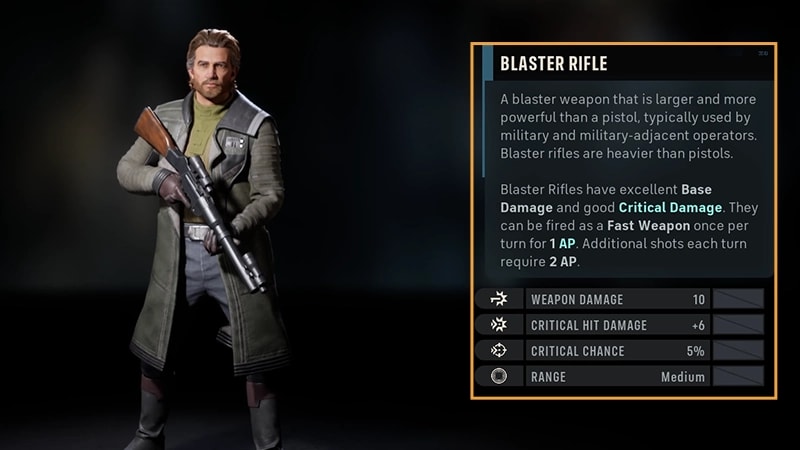
行動點數(AP)決定了每個特務在戰鬥回合中可以做什麼。每個小隊成員在開始回合時擁有三點行動點數。你需要花費行動點數才能在戰鬥中使用你的武器,但行動點數費用取決於武器類型而定。有些武器可在發射後留下足夠的行動點數來移動或使用能力。有些武器在發射時可能會使用大部分或全部可用的行動點數。以下行動也會花費行動點數:
- 在戰場上移動
- 更遠移動距離會使用更多行動點數。
- 使用監視自動攻擊在敵人回合期間穿過目標區域,或在目標區域內採取行動的敵人
- 使用工具物品,例如醫療包和手榴彈
- 啟動能力,包括攻擊、增益效果和其他專精能力。
有時,你需要使用特殊能力來擊敗更強大的敵人。使用這些特殊能力需要花費優勢而不是行動點數。 你的隊伍成功發動攻擊時,就能獲得優勢。每有一名特務傷害敵方,隊伍就獲得 1 點優勢。請查看我們的回合制戰術與戰鬥基礎指南,了解在《Star Wars 零號連隊™》中如何使用優勢。
我可以選擇哪些武器類型選項?
以下是你在《Star Wars 零號連隊™》中可選擇的武器類型選項。- 爆能步槍是專為中距離戰鬥設計的多功能武器。
- 它能造成高基礎傷害,並具有良好的暴擊傷害,是持續攻擊的可靠選擇。
- 連發槍是一種火力強大的大型爆能武器,具有持續性火力。
- 如果在發射時投入更多的行動點數,會造成更高的傷害。
- 爆能手槍常作為個人副武器使用,是適用於近距離戰鬥的快速武器。
- 它造成的傷害低於其他爆能槍武器,但可以使用較少的行動點數重複射擊。
- 長管爆能槍是高火力武器,精準度極佳,是遠距離戰鬥的理想選擇。但需要注意,長管爆能槍可能比較難操控。
- 它能造成高基礎傷害和暴擊傷害,是遠距離殲滅敵人的絕佳選擇。
7. 檢視你的檔案
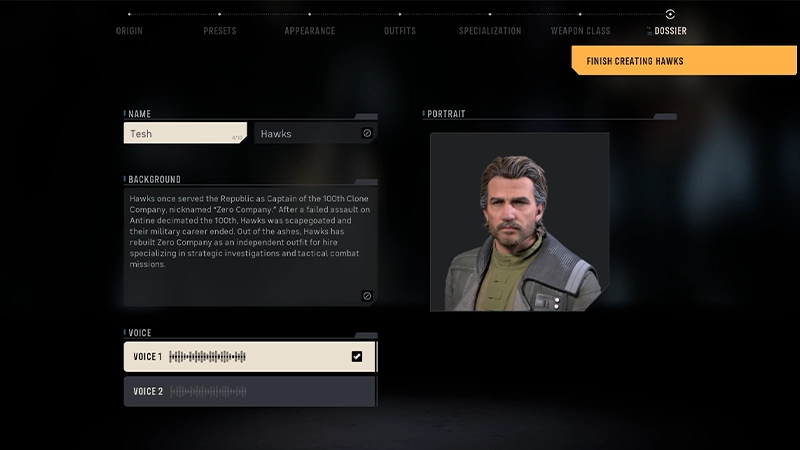
在檔案畫面中,依下列步驟完成霍克斯的建立和自訂項目:- 在名稱方塊中輸入名字
- 選擇語音。
我該怎麼知道在創建霍克斯時要選哪些選項?
不確定要選擇哪些自訂選項?別擔心,完成初始戰鬥教學後,你可以更改建立霍克斯時所做的許多選擇。 解鎖巢穴後,前往自訂設施編輯霍克斯的:
- 來源和語音(從 個人檔案分頁中)
- 外觀
- 服裝。
- 選擇你最喜歡的物種,或最吸引你的物種。
- 每個起源都會更改角色建立過程中可用的外觀選項,但不會影響霍克斯的戰鬥風格。
- 如果你想立刻開始或更快進入遊戲,請選擇兩個可用預設之一。
- 如果你想從頭開始建立屬於你自己的獨特霍克斯造型,選擇自訂。
- 這些純粹是外觀上的選擇,不會影響霍克斯在遊戲中的互動
- 自訂霍克斯的臉部特徵、頭髮、身體彩繪和其他視覺細節,以建立你想要的外觀。
- 這些純粹是外觀上的選擇,不會影響霍克斯在遊戲中的互動
- 混合搭配服裝,打造你喜歡的服裝風格。
- 你的專精決定了霍克斯的戰鬥方式。
- 在選擇專精之前,請考量你想在隊伍中扮演的角色。
- 有關更深入的專精概覽以及如何選擇的提示,請查看我們的專精指南。
- 每個武器類型使用行動點數(AP)的方式各不相同,所以請記住,你的選擇會影響霍克斯在每個回合可以採取的行動次數。
- 如需更深入的武器類型概覽以及如何選擇武器的提示,請查看我們的武器類型指南。