How to find and redeem missing worlds in The Sims 3

6 min read

概述

If you bought a world for The Sims 3, but it isn't showing up in your game, you may need to download it from The Sims 3 Store or redeem your product code first. This guide explains how to find missing worlds, where to download your world from on The Sims 3 Store, and how to install it. Plus, find out how to redeem product codes for The Sims 3 worlds, and how to get more help if our troubleshooting steps don’t fix your issue.

How do I find a missing world in The Sims 3?

Worlds for The Sims 3 must be downloaded through The Sims 3 Store website, even if you bought the world through the EA app.To help avoid download or syncing issues, we recommend you buy The Sims 3 worlds directly from The Sims 3 Store if possible.
Can’t find your new The Sims 3 world? If you buy a world for The Sims 3, it won’t automatically appear in your game the next time you launch it.Whether you bought the world from The Sims 3 Store or the EA app, you need to download it from The Sims 3 Store before you can use it in-game.Here’s how to find, download, and install The Sims 3 worlds.

How do I download and install The Sims 3 worlds?

If you bought a world for The Sims 3 on the EA app, you’ll need to redeem the product code on The Sims 3 Store website before you can download it.
  1. 1
    Go to The Sims 3 Store website and log in using the same EA Account you used to make the purchase.
  2. 2
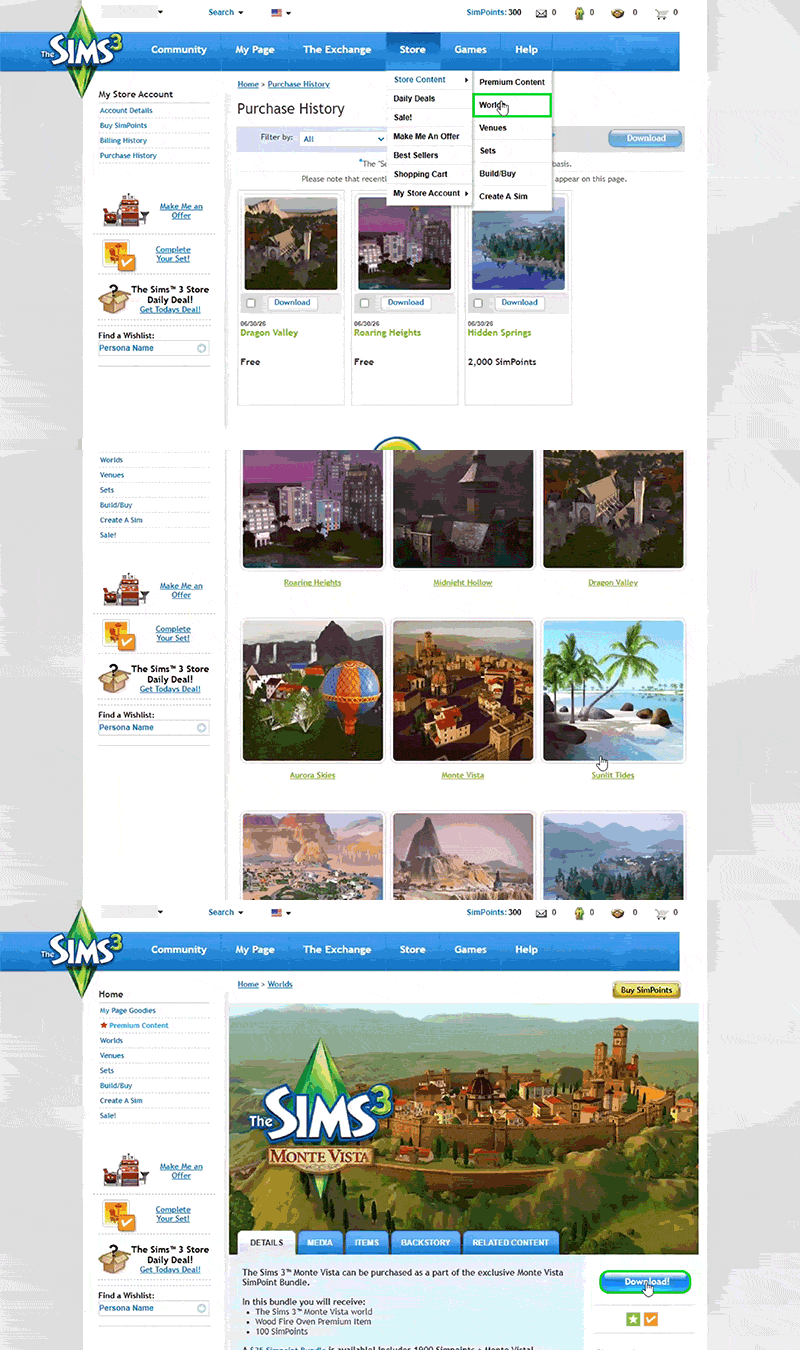
    Select Store and choose My Store Account > Purchase History.
  3. 3
    Find the world you’re missing in-game and select Download.
  4. 4
    Open the EA app and launch The Sims 3. 
  5. 5
    Select Downloads, find the world you want to install, and use the checkbox to select it.
  6. 6
    Select Install.

What if the world isn’t in my Purchase History?

If you checked My Store Account > Purchase History in The Sims 3 Store, but still can’t find the world you bought, try these steps.
  1. 1
    Go to The Sims 3 Store website and log in using the same EA Account you used to make the purchase.
  2. 2
    Select Store and choose Store Content > Worlds.
  3. 3
    Find and select the world you’re missing in-game.
  4. 4
    On the world product page, select the blue Download button.
  5. 5
    Open the EA app and launch The Sims 3.
  6. 6
    Select Downloads, find the world you want to install, and use the checkbox to select it.
  7. 7
    Select Install.
On The Sims 3 Store website, the mouse points to Store, selects Store Content from a drop-down menu, and then selects Worlds.

What if there’s no download option on the world product page?

If there’s no download option for your missing world in your Purchase History or the world product page on The Sims 3 Store, you may need to redeem the product code first.

How do I redeem a world code for The Sims 3?

If you bought a world for The Sims 3 on the EA app, you need to redeem your product code on The Sims 3 Store website before you can download the world or use it in-game. To get started, write down or copy your product code.

Where can I find my product code?

You can find your world product code:
  • in your EA order confirmation email
  • in your EA Account details
  • inside the game box, if you have a physical copy.
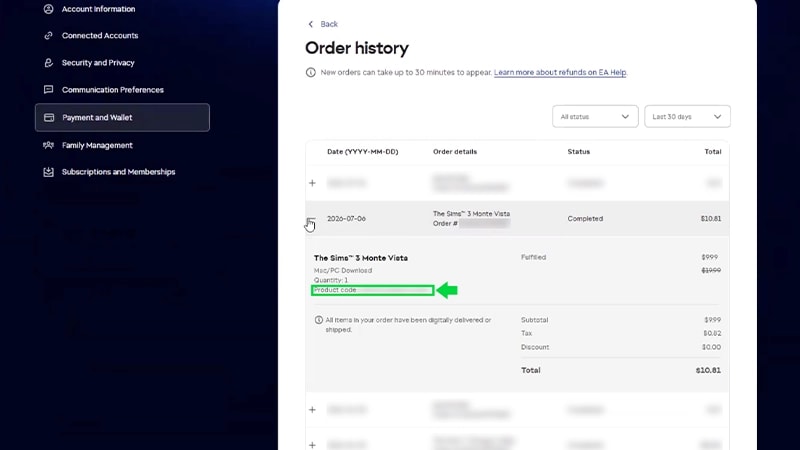
Here’s how to find your world product code in your EA Account details.
  1. 1
    Log in to your EA Account using the same details you used to buy The Sims 3 world.
  2. 2
    Select the Payment & Wallet tab and choose Order History.
  3. 3
    Find your The Sims 3 world order and select + plus symbol to expand the order details. 
  4. 4
    Write down or copy your Product code.
The Order History page of an EA Account, with a Sims 3 world product code highlighted by a green box and arrow.

How do I use my product code?

After you have your product code, follow these steps to redeem it on The Sims 3 Store website. 
  1. 1
    Go to The Sims 3 Store website and log in using the same EA Account you used to make the purchase.
  2. 2
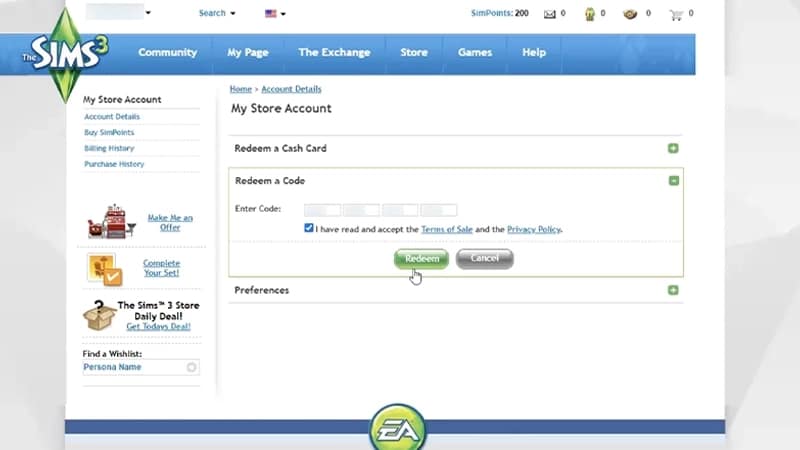
    Scroll to the bottom of the page. Under My Account, choose Redeem a Code
  3. 3
    Enter your product code and select the checkbox to confirm you accept the Terms of Sale and Privacy Policy.
  4. 4
    Select Redeem.
 The Redeem a Code section on the My Store Account page, with code fields, an acceptance checkbox, and a green Redeem button.After you’ve redeemed your product code, download and install your world for The Sims 3 through either:
  • your Purchase History 
  • the world product page.

What can I do if I still can’t find The Sims 3 worlds I bought?

If you can’t redeem a world product code on The Sims 3 Store, or still can’t find a world you bought, try these fixes.
  • Double-check that you logged into The Sims 3 Store with the correct EA Account. You need to use the same EA Account details you used to buy The Sims 3 world.
  • Restart your device.
  • Visit the EA server status page to check if the EA app is down. If it is, you may not be able to download, install, or use your The Sims 3 world until the server issues are solved.
  • Make sure your purchase was successful.
    • Check you got an order confirmation email.
    • Check your bank account to make sure the transaction went through.
If you tried these troubleshooting steps, but are still having issues, reach out to us for more help.Make sure you have this info ready before contacting us:
  • your EA Account email
  • the name of The Sims 3 world you’re having issues with
  • whether you bought The Sims 3 world on the EA app or on The Sims 3 Store
  • the approximate date and time you bought the world
After you’ve gathered these details, get in touch using the Contact us button at the bottom of this page.

Missing worlds in The Sims 3: FAQ

仍然有问题?
请联系我们的客户支持团队获取更多帮助。