Overview
If you can’t find your games, try these steps to see if they’re hidden, your purchase is still processing, or if you lost access.
Missing games
If you’re missing your game, you might be having problems with your EA Account or your payment method. Here’s what you can do.Check if your payment went through
If your new game isn’t in your Library, your order might still be processing- 1Go to the EA Account Payment and Wallet tab.
- 2Select your Order history.
- 3Check the order status for your purchase.
- If it’s still processing, you’ll get your game when it’s completed.
- If your order isn’t showing, then you may have bought the game on another account. Try logging in to the EA Account Settings portal with other email addresses you may have used instead.
Make sure you purchased a full game and not DLC or a subscription. Games like The Sims and Battlefield have multiple expansions and subscriptions that only become active when you own the base game.Only full games show up in your EA app Library. If you’re looking for missing DLC or expansion packs, find out more below.
Check your ban status
If you have a ban or suspension on your account, you may have lost access to your game. Follow these steps to check your ban status, make an appeal, or resecure your account if you think it was hacked.Check if your EA Play membership is active
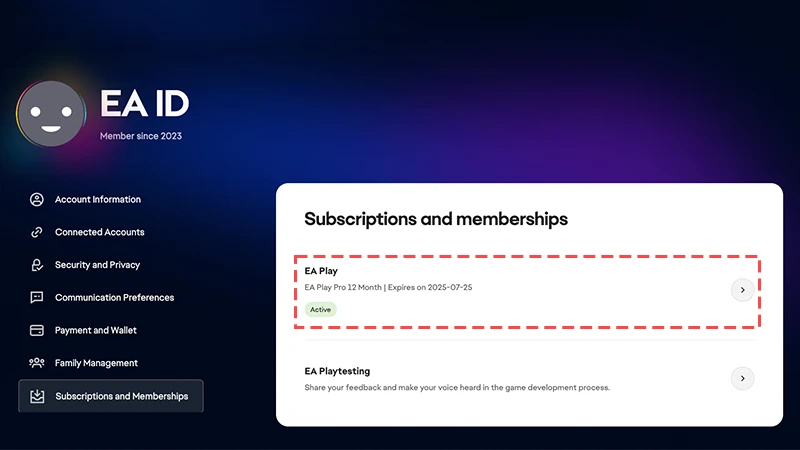
If you don’t own your game outside of your EA Play membership, you’ll need to make sure it’s active to keep playing- 1
- 2If you have an active EA Play membership, you’ll see Active underneath EA Play, along with when your membership expires.
Missing DLC or expansion packs
Here’s where to find your expansion packs and downloadable content (DLC):- 1Launch the EA app and log in to your account.
- 2Select Library.
- 3Hover over the game tile you bought the expansion pack or DLC for, and select the three dots that appear in the top-right corner.
- 4Select Manage add-ons.
If your game is still missing
- 1Try clearing your cache.
- 2Select the menu icon (it looks like 3 horizontal lines) in the top left corner of the app, hover over Help, then click Restart app.
- If this doesn’t work, log out of the app and back in again to refresh your Library. You can also try uninstalling and reinstalling the EA app.