Overview
Cross-play is available in UFC 6. Learn how to play with friends on PlayStation®5 and XBOX X|S.
What is cross-play?
Cross-play lets you compete with friends and other players across different platforms in specific online multiplayer modes.For example, if you’re playing UFC 6 on a PlayStation®5, turning on cross-play lets you compete with friends playing on XBOX Series X|S.
How to turn on cross-play in UFC 6
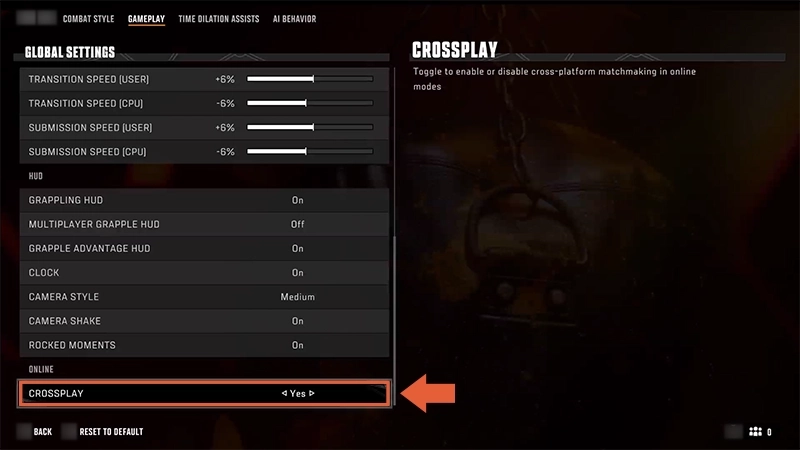
Cross-play is turned on by default in-game when you launch UFC 6 for the first time.If you play on XBOX, your cross-play settings might also be determined by your platform settings. Learn more about cross-play on XBOX.
- 1From the main menu, go to Settings in the top navigation bar.
- 2Select Gameplay.
- 3Press R1 on PlayStation® or RB on XBOX to reach the Gameplay tab.
- 4Scroll down to Crossplay.
- 5Choose Yes.
How to play UFC 6 with friends on other platforms
UFC 6 is available to play on PlayStation®5 and XBOX Series X|S. It's not available on older consoles.
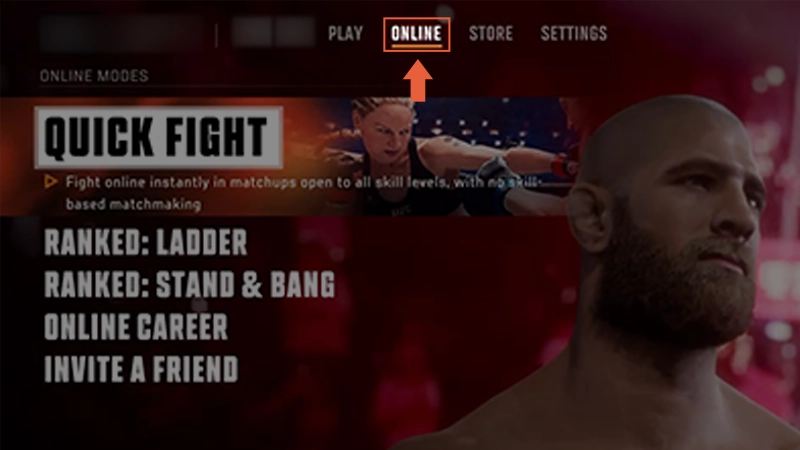
- 1Go to the Online tab from the main menu.
- 2Select Invite A Friend.
- 3Open EA Connect by pressing R3 on PlayStation® or the Right Stick on XBOX.
- 4Search for your friend using their EA ID, XBOX gamertag, or PlayStation® Online ID (PSN ID).
- 5Send an invite and start your fight.
Which UFC 6 modes have cross-play?
You can compete with other players using cross-play in these online modes.- Quick Fight
- Ranked: Ladder
- Ranked: Stand & Bang
- Online Career
- Invite A Friend