Übersicht
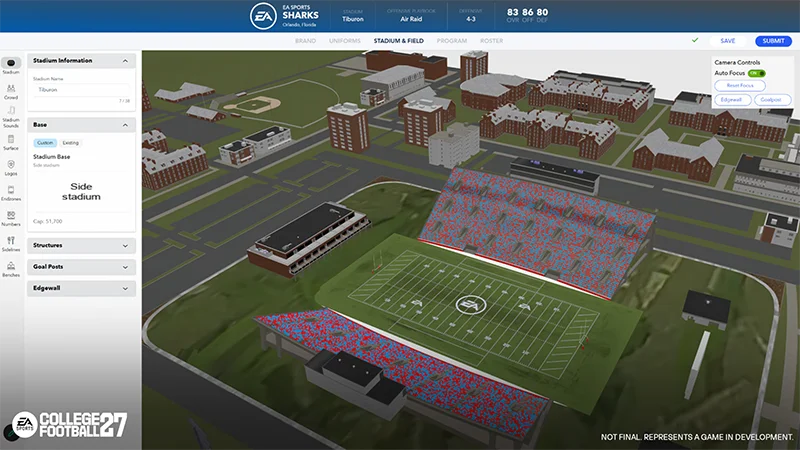
Du kannst dein Stadion mit dem Stadion-Builder anpassen, den du unter Stadion & Feld findest. Wähle "Custom" (selber erstellen) aus und wähle dann verschiedene Optionen aus und sieh dir eine Vorschau an, um ein einzigartiges Stadion zu erstellen.
Wie verwende ich den Stadion-Builder?
- 1Gehe in einem Desktop-Browser zur Team-Builder-Website auf ea.com.
- 2Gehe zu Stadion & Spielfeld, und wähle dann Stadion.
- 3Wähle unter Stadiontyp entweder Personalisiert oder Vorerstellt.
- Wenn du "Personalisiert" wählst, entwirfst du dein eigenes Stadion.
- Wenn du "Vorerstellt" wählst, kannst du entweder ein reales Stadion aus einem der verfügbaren Teams im Spiel oder ein generisches Stadion auswählen. Dort werden dir alle verfügbaren Stadien angezeigt.
- Generische Stadien können nicht angepasst werden.
Möchtest du mehr über andere Anpassungsoptionen erfahren? Lies unseren Leitfaden dazu, wie du den Team Builder verwendest in College Football 27.
Wie passe ich ein Stadion an?
Nachdem du Personalisiert ausgewählt hast, kannst du mit der Anpassung deines Stadions beginnen.Stadion
Wählen Sie eines von vier anpassbaren Basisstadien aus der Liste aus und passe dann die Basisstrukturen an.Verfügbare Optionen hängen vom gewählten Basisstadion ab, können aber Folgendes umfassen:- Stadion-Hintergrund
- Jumbotron-Videoanzeige
- Endzonengebäude
- Begrenzungswand
- Torstangen
Zuschauer:innen
Wähle die Farben der Zuschauer:innen und lege die prozentuale Aufteilung zwischen ihnen fest. Erstelle das gewünschte Stripe-Out-Design, wie einfarbig, Schachbrettmuster, vertikale Streifen oder horizontale Streifen, und lege dann die Bedingungen fest, die das Stripe-Out auslösen.Du kannst bis zu fünf automatische Stripe-Out-Auslöser festlegen, darunter:- Nachtspiele
- Rivalitätsspiele
- Top-25-Begegnungen
- Konferenzspiele.
Stadiongeräusche
Erstelle benutzerdefinierte Spieltag-Audios, darunter:- Zuschauergesänge
- Band-Anfeuerungsrufe
- Soundeffekte
- Kampflieder
- PA-Fanfaren
- Kommentator:innen.