Overview
Learn how to find and troubleshoot missing Battlefield 6 content, like Phantom Edition content, Twitch Drops, Battlefield 6 Beta rewards, and Battlefield 2042 unlocks, with our step-by-step guide.
Troubleshoot missing content in Battlefield 6
If you’re missing all your items, your EA Account might have been hacked. Find out how to re-secure your account.
Restart your system
Restarting your system can help missing content load. Once you’ve restarted your game, check to see if your content has loaded.Check which EA Account you’re logged into
If you’ve got more than one EA Account, you might be logged into the wrong one. Go to the Account Information section of your account settings to check which EA Account you’re using. If your content has been sent to the wrong EA Account, we can’t transfer it.Check for server status issues
If your game or platform’s servers are down, your content might not come through until issues are fixed. Check our server status page and see if we’ve mentioned any problems on @EAHelp or @Battlefield.Check in-game
Make sure you didn’t accidentally discard or use your content somewhere in your game. We can’t help with items you’ve used or discarded. For help finding specific types of content, check out our steps for missing:If you’re missing premium currency or items bought with real-world money
After you’ve tried the steps above, confirm the transactions went through with your bank account and the physical store or digital retailer.If the transaction went through, wait at least 24 hours from when you made your purchase. It can take time for a purchase to go through and for the items you’ve bought to show up in the game.If you play on the EA app, you can also see certain purchases in your EA Account Order History. For more info about checking your EA order history, read our guide.Contact us
If you’ve tried the steps above and waited 24 hours but your content still hasn’t appeared, contact us from the bottom of this page. Try to have this info ready so we can help you faster.- Your EA Account email
- The type of console or platform you play on (e.g., PC or PlayStation®)
- Your platform account username
- Details about the missing content
- How or where you got the content
- The approximate date and time you got the content and when you noticed it was missing.
- Proof of purchase if you bought the missing content with real money
Proof of purchase is usually an image of your transaction history and purchase confirmation which includes info like the product name, purchase date, and your details.For more help, read our guide.
- didn’t earn
- sent to the wrong platform or account.
Pre-order and Phantom edition content
Pre-order content was made available in Battlefield 6 at launch.- If you ordered the Phantom Edition, you’ll get all the Phantom Edition content and the Tombstone Pack pre-order content.
- If you ordered the Standard Edition, you’ll get the Tombstone pre-order content.
The Standard Edition includes: The Phantom Edition includes:
- Tombstone Pre-Order Pack Offer
- Features a soldier skin and a Tombstone XP Boost Set
- Tombstone Pack Pre-Order Offer
- Features a soldier skin and a Tombstone XP Boost Set
- Battlefield Pro Token: Battle Pass, 25 tier skips, exclusive rewards and more
- Your Battlefield Pro Token will be redeemed during the active Battlefield season.
- Phantom Squad: Crossbones, Mirage, Specter, and Wraith soldier skins
- Glimmer melee knife weapon skin
- Shrouded M433 weapon package
- Drop Shadow MS2010 ESR weapon package
- Chimera M1A2 SEPV3 vehicle skin
- Death’s Head weapon sticker
- Cryptic weapon charm
- Operative dog tag
- Phantom XP boost set: 2x hardware XP and 2x career XP
You’ll find everything but your tier skips and Battlefield Pro Token in the Loadouts tab.To find your content: You can use these steps for all other classes, weapons, and vehicles.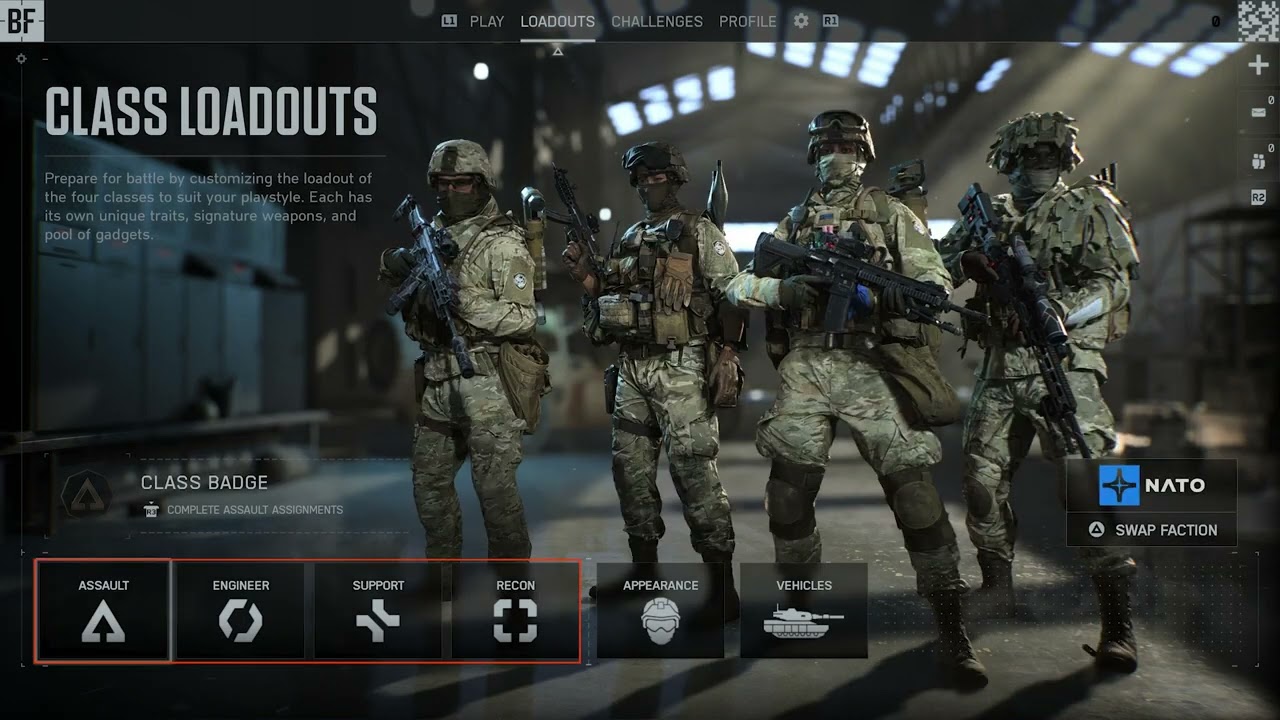
- 1From the main menu, open the Loadouts tab.
- 2Choose Nato or Pax Armata. Some skins are only available for either faction.
- You can switch between factions in the soldier menu.
- 3Select your soldier.
- 4On the class screen, press X on PlayStation®, A on Xbox, or left click on PC to open the soldier parts option (the hovering gray box over your soldier).
- 5Select a character, then Customize by pressing Square on PlayStation®, Y on Xbox, or X on PC.
- 6A menu will appear which shows all the unlocks you’ve earned for that character.
Twitch Drops
Before you try to claim any Twitch Drops, make sure your Battlefield 6 and EA Accounts are linked. If you need help, use our guide to check which account is linked or troubleshoot issues.- Twitch Drops appear on the first platform you log in to after claiming your reward, so make sure you claim your Drop on the platform you want it on. We can’t transfer Twitch Drops.
- Drops you earn will be available in your Twitch Drops Inventory and must be claimed within 24 hours. They’ll appear in Battlefield 6 and REDSEC after you claim them.
If you’re having trouble with a Twitch Drop:
- 1Make sure you completed the Twitch objectives to earn your Drop.
- 2Confirm you claimed the Drop on Twitch. You need to do this within 24 hours.
- 3Check you’re linked to the right EA Account. We can’t transfer Drops between EA Accounts.
Battlefield 6 Beta rewards
If you earned rewards playing the Battlefield 6 Beta, they’ll be available when you log in to Battlefield 6.You must have completed the challenges in the Battlefield 6 Beta to have earned these rewards. You can’t earn these afterwards, and we can’t grant these items. Here’s an overview of what you could earn over the Battlefield 6 Beta.| Challenge | Reward | ||
|---|---|---|---|
| Reach Level 10 | Lights Out Player Card | ||
| Reach Level 15 | All Terrain Character Skin | ||
| Reach Level 20 | Night Terror Weapon Charm | ||
| Assault: Get 50 Close Quarter Kills (within 10m) | Striking Distance Weapon Package | ||
| Support: Revive 100 teammates | Own the Night Weapon Sticker | ||
| Engineer: Repair 3000 health to vehicles | After Dark Weapon Sticker | ||
| Recon: Spot 300 Enemies | Seeker Character Skin |
| Challenge | Reward | ||
|---|---|---|---|
| Capture 42 flags in Conquest, Domination or King of the Hill | War Machine Vehicle Skin | ||
| Get 200 kills or assists | Bat Company Dog Tag | ||
| Capture 10 sectors in Breakthrough or Rush | Dominion Weapon Package |