Overview
Here’s what you need to know about pre-ordering games on the EA app, including billing and cancellation details.
Pre-ordering games on the EA app
- 1Search for the game you want to pre-order on the EA app, then select it.
- 2Click Select Edition. You’ll be taken to a page with more info about the bonus content that comes with each pre-order edition.
- 3Choose the edition you want to buy.
- 4Follow the payment instructions to complete your purchase.
You’ll be charged immediately after placing your order. Make sure your payment method is up to date on your account.
How to cancel pre-orders
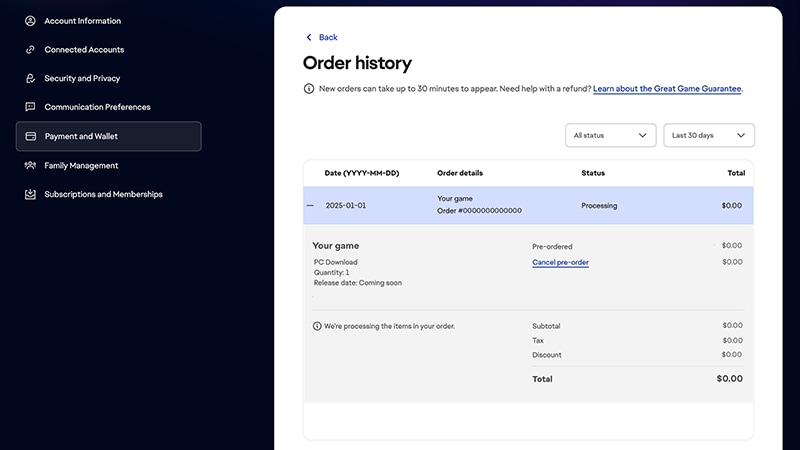
- 1Go to your EA Account Payment and Wallet.
- 2Select Order History.
- 3Find your pre-order and select the plus sign (+) to expand it.
- 4Under the Status column, select Cancel pre-order.
If you pre-ordered from another retailer
If you’ve pre-ordered your game from another retailer, contact them to find out how to cancel your pre-order.- If you pre-ordered digitally on Xbox, contact Xbox Support.
- If you pre-ordered digitally on PlayStation®, contact PlayStation® Support.
If you’re a member of EA Play Pro
If you’ve pre-ordered a game that’s included in EA Play Pro you can cancel it and get a refund for your game any time before the game launches.Remember: if you cancel your membership and haven’t bought the game separately, you’ll lose access to it until you resubscribe to EA Play Pro or buy the game.Not a member of EA Play yet? If you become an EA Play Pro member, you can choose to cancel your pre-order or get a refund on pre-ordered games that are included in the service.