Overview
Learn how to get help in College Football Mobile. While you’re at it, find and save your User ID. We’ll need your ID to help you if you’re ever locked out of your game.
Get help in your game
The fastest way to get help is by contacting us directly in your game.- 1From the main menu screen, select the cogwheel in the top-right corner to open Settings.
- 2Select Support next to the Customer Support to open our in-game help articles.
- 3If you need more help, contact us by selecting the chat button (it looks like a text bubble) in the top-right corner.
Think you lost game progress? See if you can restore your progress.
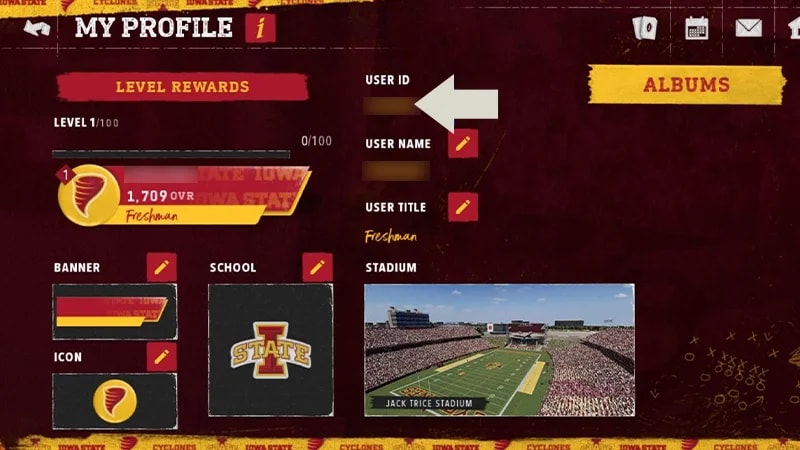
Find your User ID
- 1From the Home Screen, select your Profile Name in the top left to open the My Profile screen.
- 2Find your User ID (UID) at the top center of the screen.
Make sure to save your UID (a screenshot is an easy way to do this). You’ll need to have it ready if you’re ever locked out of the game and need to contact us.
Can’t access the game?
If you’re locked out of your game or lost your device, have your UID ready before you contact us. Without it, we can’t find your account.If you don’t know your UID, we may be able to help if you’ve linked your account to an EA Account. We can’t recover guest accounts.