ข้อมูลโดยรวม
การต่อสู้ใน STAR WARS Zero Company™ เป็นแบบผลัดตาเดิน โดยหน่วยรบของคุณจะใช้Action Point (AP) เพื่อเคลื่อนที่, โจมตี, ใช้ความสามารถ และเอาชนะศัตรูด้วยกลยุทธ์ที่เหนือกว่า หากคุณยังเป็นมือใหม่เรื่องยุทธวิธีแบบผลัดตาเดิน ให้เรียนรู้วิธีทำงานของกลไกหลักต่างๆ เช่น Cover, Chance-to-Hit, Overwatch, Advantage, Permadeath และ Rally ใน STAR WARS Zero Company™
ส่วน: การต่อสู้แบบผลัดตาเดินทำงานอย่างไรใน STAR WARS Zero Company™?
การต่อสู้ใน STAR WARS Zero Company™ เป็นแบบผลัดตาเดิน ซึ่งหมายความว่าคุณและศัตรูของคุณจะสลับกันเดินเกม คุณและเหล่า Operator ทั้งหน่วยรบจะใช้ตาเดินร่วมกันสมาชิกหน่วยรบแต่ละรายจะมี Action Point (AP) 3 แต้มที่สามารถใช้กับการเคลื่อนไหว, การโจมตี, ความสามารถ และแอ็กชันอื่นๆ ได้ แอ็กชันต่างๆ จะใช้จำนวน AP ที่แตกต่างกันไป การจัดการ AP ของคุณอย่างมีประสิทธิภาพเป็นหนึ่งในส่วนที่สําคัญที่สุดของการต่อสู้ หลังจากที่ใช้ AP ของหน่วยรบของคุณจนหมดแล้ว ให้สิ้นสุดตาของคุณเพื่อให้ศัตรูเริ่มแอ็กชันคุ้นเคยกับพื้นฐานการต่อสู้แบบผลัดตาเดินอยู่แล้ว แต่ต้องการเคล็ดลับสักหน่อยใช่ไหม? ดูคู่มือแนะนำของเราเพื่อเรียนรู้วิธีพัฒนายุทธวิธีแบบผลัดตาเดินใน STAR WARS Zero Company™
Campaign คือข้อมูลบันทึกเกมของคุณใน STAR WARS Zero Company™ นี่หมายความว่าเมื่อคุณเริ่ม Campaign ใหม่ คุณกําลังสร้างข้อมูลบันทึกเกมใหม่อยู่ เมื่อคุณสร้างความคืบหน้าในเกมไปเรื่อยๆ Operator ที่คุณเกณฑ์เข้าหน่วย, Operation ที่ทำเสร็จ, Tactical Mission, การตั้งค่าเกมเพลย์ และอื่นๆ จะได้รับการจัดเก็บไว้ใน Campaign ของคุณ
- 1เมื่อคุณเล่น STAR WARS Zero Company™ เป็นครั้งแรก ให้สร้าง Campaign ใหม่โดยเปิดเมนูหลักแล้วเลือก New Campaign
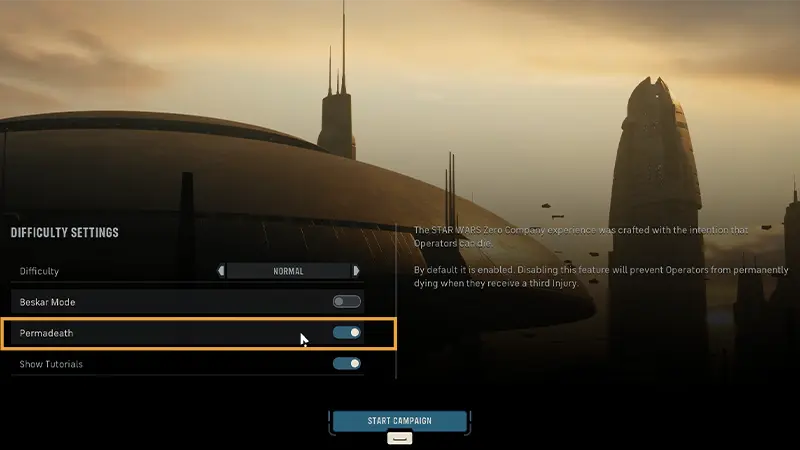
- 2เลือก Difficulty Settings ของคุณ ซึ่งรวมถึงการเปิดหรือปิด Permadeath
- การตั้งค่าเหล่านี้จะใช้กับ Campaign ดังกล่าวเท่านั้น
- 3เลือก Start Campaign เพื่อเริ่มต้นการเดินทางของคุณ
- 4หากคุณมี Campaign ที่บันทึกไว้อยู่แล้ว ให้เลือก New Campaign หากต้องการเริ่มการบันทึกเกมใหม่ตั้งแต่ต้น
ตัวเลือกที่คุณเลือกในหน้าจอ Difficulty Settings จะไม่สามารถเปลี่ยนแปลงได้หลังจากที่เลือก Start Campaign หากคุณเปิด Permadeath ไว้ การตั้งค่าดังกล่าวจะยังคงอยู่ตลอดทั้ง Campaignหากคุณเปิด Beskar Mode ไว้ คุณจะมีข้อมูลบันทึกเกมเพียงรายการเดียวและจะไม่สามารถบันทึกด้วยตนเองได้ นี่หมายความว่าตัวเลือกในเกมของคุณและผลที่ตามมาจะเป็นแบบถาวร หากต้องการปิด Permadeath หรือ Beskar Mode คุณจะต้องเริ่ม Campaign ใหม่
Operator คือสมาชิกของหน่วยรบที่คุณควบคุมในสมรภูมิรบ โดย Operator แต่ละรายจะมีจุดแข็ง อุปกรณ์ และบทบาทการรบของตนเอง เมื่อคุณสร้างความคืบหน้าผ่าน STAR WARS Zero Company™ คุณสามารถรับ Operator รายใหม่ๆ และปรับแต่งพวกเขาให้เหมาะกับสไตล์การเล่นของคุณได้ไม่มี Operator รายใดที่ต่อสู้ในรูปแบบเดียวกันเป๊ะๆ การศึกษาจุดแข็งและความสามารถ และเข้าใจบทบาทที่ Operator แต่ละรายมีต่อหน่วยรบของคุณจะช่วยให้คุณมีโอกาสต่อสู้สำเร็จมากยิ่งขึ้น
Action คือทุกสิ่งที่ Operator สามารถทําได้ในระหว่างตาของพวกเขา หากต้องการทำแอ็กชัน คุณจะต้องใช้ Action Point (AP)ในระหว่างตาของคุณ คุณสามารถใช้ AP เพื่อ:แอ็กชันบางอย่างต้องใช้ AP มากกว่าแอ็กชันอื่นๆ เช่น ยิ่งระยะเคลื่อนที่ในสมรภูมิรบของคุณเพิ่มขึ้น ก็ยิ่งใช้ AP มากขึ้น แอ็กชันอื่นๆ เช่น Call for Backup ไม่ต้องใช้ APเพราะคุณมีจํานวน AP จำกัดในแต่ละตา การตัดสินใจว่าจะทำแอ็กชันใดและทำในลําดับไหนจึงเป็นส่วนสําคัญของการต่อสู้ทุกครั้ง
- เคลื่อนไหวไปรอบๆ สมรภูมิรบ
- โจมตีศัตรู
- ใช้ความสามารถต่างๆ
- ใช้ไอเท็ม Utility เช่น Medkit หรือ Grenade
- ตั้งค่า Overwatch
ก่อนที่คุณจะโจมตีศัตรู ให้ตรวจดูเปอร์เซ็นต์ Chance-to-Hit ที่แสดงอยู่ข้างเป้าหมายก่อน ค่านี้จะแสดงให้เห็นว่า การโจมตีของคุณมีโอกาสโดนเป้าหมายที่เลือกมากแค่ไหน 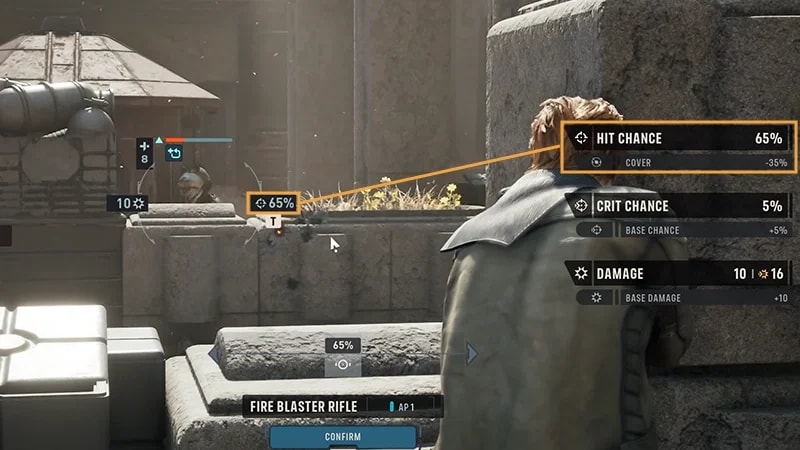
- ระยะทาง
- ยิ่งศัตรูอยู่ไกล การโจมตีโดนเป้าหมายยิ่งมีโอกาสน้อยลง
- พิสัยของอาวุธ
- อาวุธบางประเภทจะมีประสิทธิภาพมากกว่าเมื่อใช้ในระยะใกล้ ในขณะที่อาวุธบางประเภทจะมีประสิทธิภาพมากกว่าเมื่อใช้จากที่ไกล
- เส้นสายตา
- โดยปกติแล้ว Operator ของคุณมักต้องการมุมมองที่เห็นศัตรูได้ชัดเจนก่อนทําการโจมตี
- คุ้มกัน
- ศัตรูที่อยู่หลังที่กำบังจะโจมตีได้ยากกว่าศัตรูที่ยืนอยู่ในที่โล่ง
- การวางตําแหน่ง
- การเคลื่อนที่ไปยังตําแหน่งที่ดีกว่า เช่น โจมตีศัตรูจากด้านข้างหรือโจมตีจากพื้นที่ที่สูงกว่า สามารถเพิ่ม Chance-to-Hit ของคุณได้
ที่กำบังจะลดโอกาสที่ศัตรูจะโจมตีโดนคุณและช่วยปกป้อง Operator ของคุณจากการโจมตีที่กำบังมี 2 ระดับด้วยกัน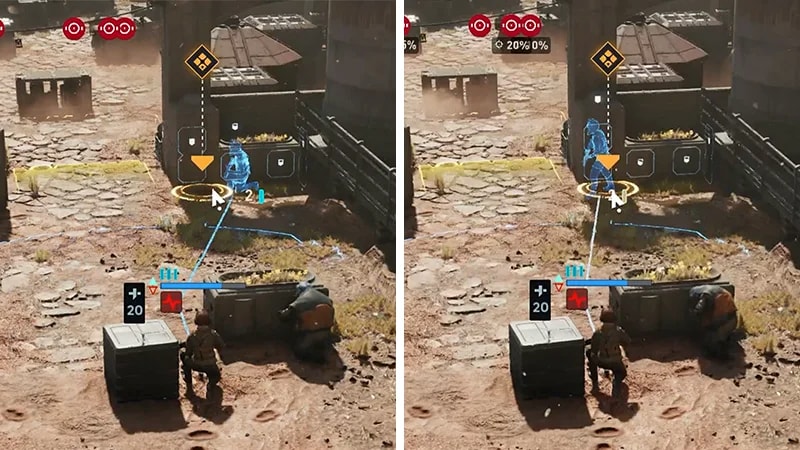
- Partial cover ทําให้โจมตีโดน Operator ของคุณได้ยากขึ้น
- Full cover ให้การคุ้มกันที่มากยิ่งขึ้นไปอีก
Melee Attack ช่วยให้ Operator สามารถโจมตีศัตรูในระยะใกล้ได้แทนที่จะใช้อาวุธพิสัยไกลMelee Attack แตกต่างจากการโจมตีด้วยบลาสเตอร์ตรงที่ต้องให้ Operator ของคุณเคลื่อนที่เข้าไปใกล้เป้าหมาย การวางตําแหน่งจึงมีความสําคัญเป็นพิเศษ Melee Attack บางส่วนยังอาจช่วยบีบให้ศัตรูต้องออกมาจากที่กำบังหรือต้องเข้าไปในพื้นที่อันตรายได้อีกด้วยOperator ที่มี Specialization ด้านการต่อสู้ระยะประชิดจะเชี่ยวชาญการสร้างความเสียหายรุนแรง, การควบคุมการวางตําแหน่งของศัตรู และการสร้างโอกาสให้แก่สมาชิกที่เหลือในหน่วยรบ หากคุณกําลังใช้ Operator ที่เน้นการต่อสู้ระยะประชิด ให้ใช้ที่กำบังและประสานงานกับสมาชิกที่เหลือในหน่วยรบของคุณเพื่อบีบระยะเข้าไปอย่างปลอดภัยก่อนโจมตี
Overwatch ช่วยให้ Operator สามารถเฝ้าดูหรือทำแอ็กชันในพื้นที่ที่เลือกในระหว่างตาของศัตรูได้หากศัตรูเคลื่อนที่ผ่านหรือทำแอ็กชันในพื้นที่เป้าหมาย Operator ของคุณก็จะเข้าโจมตีโดยอัตโนมัติ วางโคน Overwatch ของคุณไว้ตรงจุดที่ศัตรูน่าจะทำการเคลื่อนไหว การทำเช่นนี้สามารถช่วยให้คุณ:การใช้ Overwatch จะเป็นการสสิ้นสุดตาของ Operator รายนั้นๆ ในทันที ดังนั้นมันจึงมักจะมีประสิทธิภาพมากที่สุดเมื่อใช้เป็นแอ็กชันขั้นสุดท้ายของพวกเขาโปรดจำไว้ว่า ศัตรูก็สามารถตั้ง Overwatch เพื่อโจมตี Operator ของคุณได้เช่นกัน ทําลาย Overwatch ของศัตรูก่อนที่จะรุกคืบเพื่อหลีกเลี่ยงการถูกโจมตีอัตโนมัติ
- ขัดขวางการเคลื่อนไหวของศัตรู
- ป้องกันพื้นที่สําคัญ
- ปกป้องเพื่อนร่วมทีมขณะที่พวกเขาย้ายตำแหน่ง
- สั่งสอนศัตรูที่พยายามรุกคืบเข้ามา
ไอเท็ม Utility คืออุปกรณ์แบบใช้ครั้งเดียวที่ช่วยเพิ่มตัวเลือกทางยุทธวิธีให้แก่หน่วยรบของคุณระหว่างการต่อสู้ 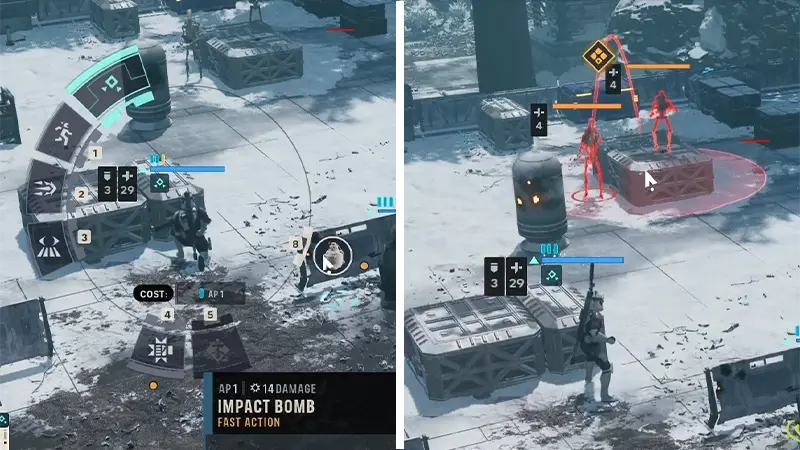
- ฟื้นฟู Health
- สร้างความเสียหายแก่ศัตรูหลายรายได้ในคราวเดียว
- ขัดขวางการเคลื่อนไหวของศัตรู
- สร้างโอกาสให้หน่วยรบของคุณ
Operator ทุกรายในหน่วยรบของคุณ รวมถึง Hawks มี Specialization Specialization แต่ละอย่างมาพร้อมกับชุดความสามารถเฉพาะตัว ความสามารถนี้จะมี Ultimate Ability 1 อย่าง, Standard Ability 1 อย่าง และ Passive Ability อย่างน้อย 2 อย่างขึ้นอยู่กับ Specialization Ability สามารถช่วยหน่วยรบของคุณได้โดย:ดูคู่มือแนะนำของเราเพื่อเรียนรู้เพิ่มเติมเรื่อง Specialization และความสามารถที่มาพร้อมกับความเชี่ยวชาญแต่ละแบบ
- Ultimate Ability
- นี่คือความสามารถที่ทรงพลังที่สุดของ Specialization
- ความสามารถนี้อาจสร้างผลกระทบที่สําคัญต่อการต่อสู้และควรนำมาใช้ในช่วงเวลาที่เหมาะสมจึงจะได้ประโยชน์สูงสุด
- Standard Ability
- นี่คือความสามารถแบบกดใช้ที่คุณสามารถใช้ได้ในระหว่างการต่อสู้เพื่อโจมตีศัตรู, สนับสนุนพันธมิตร หรือชิงความได้เปรียบทางยุทธวิธี
- Passive Ability
- ความสามารถเหล่านี้จะเปิดใช้งานอยู่เสมอ
- พวกมันจะให้โบนัสหรือเอฟเฟกต์ที่เปิดใช้โดยอัตโนมัติในระหว่างการต่อสู้โดยไม่จําเป็นต้องเปิดใช้งาน
- เพิ่มประสิทธิภาพการต่อสู้
- สนับสนุนพันธมิตร
- ทำให้ศัตรูไร้ที่กำบัง
- ควบคุมสมรภูมิรบ
- รับมือการโจมตีที่ทรงพลัง
Call for Backup คือแอ็กชันที่ทำให้ Operator ได้รับความช่วยเหลือจากสมาชิกอีกรายในหน่วยรบของคุณ นี่คือแอ็กชันฟรีที่ไม่ต้องใช้ APOperator ที่เลือกสามารถเลือกเพื่อนร่วมทีมมาช่วยในการโจมตีครั้งต่อไปได้ตาละหนึ่งครั้งOperator ที่มาช่วยส่วนใหญ่จะสมทบการโจมตีด้วยการยิงอาวุธร่วมกับเพื่อนร่วมทีม ในขณะที่บางรายจะให้เป็นโบนัสแทนเพราะ Call for Backup ไม่ต้องใช้ AP ใดๆ จึงเป็นวิธีที่ดีในการเพิ่มความเสียหายที่หน่วยรบของคุณจะทำได้โดยไม่จำเป็นต้องลดจํานวนแอ็กชันอื่นๆ ที่คุณสามารถทําได้ลองใช้ Call for Backup เมื่อ:
- คุณกําลังต่อสู้กับศัตรูที่รับมือได้ยาก
- คุณต้องกําจัดเป้าหมายให้ได้ก่อนถึงตาของศัตรู
- คุณต้องการรวมการโจมตีของ Operator หลายรายในการบุกตะลุยเพียงครั้งเดียว
Advantage คือทรัพยากรการรบส่วนกลางที่ใช้ขับเคลื่อนความสามารถพิเศษของหน่วยรบของคุณ ความสามารถพิเศษเหล่านี้แตกต่างจากความสามารถที่คุณต้องใช้ AP จึงจะใช้ได้ โดยที่ความสามารถพิเศษเหล่านี้ต้องใช้ Advantage แทน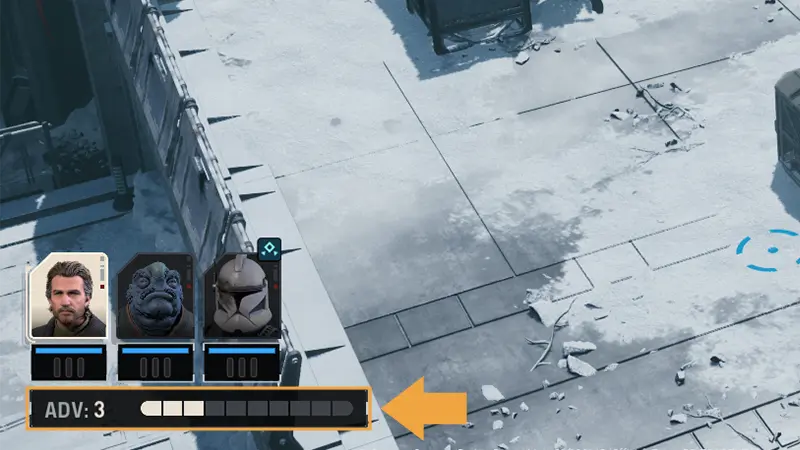
- หน่วยรบของคุณจะได้รับ Advantage x1 ทุกครั้งที่ Operator คนใดคนหนึ่งสร้างความเสียหายแก่ศัตรู
- คุณสามารถเก็บ Advantage ได้สูงสุดที่ x10 ดังนั้นการตัดสินใจว่าจะใช้ทันทีหรือเก็บไว้ใช้ในการปะทะที่ยากขึ้นจึงเป็นการตัดสินใจทางยุทธวิธีที่สําคัญ
- เมื่อใช้ Advantage คุณจะเปิดใช้ความสามารถที่ทรงพลังได้ เช่น ให้ AP เพิ่มแก่ Operator หรือเรียกการโจมตีสนับสนุน
- เพราะไม่จําเป็นต้องใช้ AP เพื่อใช้ Advantage คุณจึงยังสามารถเปิดใช้ความสามารถพิเศษได้แม้ว่า Operator ของคุณจะใช้ AP ไปหมดแล้วก็ตาม
- เพื่อนร่วมทีมสามารถ Rally Operator ที่อยู่ในสถานะ Downed เพื่อพาพวกเขากลับเข้าสู่การต่อสู้ได้
- หลังจากได้รับการระดมพลแล้ว พวกเขาสามารถทำแอ็กชันต่างๆ ต่อในระหว่างการต่อสู้ได้
- Operator ที่บาดเจ็บอาจมีประสิทธิภาพในการต่อสู้น้อยลงเมื่อพวกเขากลับมาต่อสู้
- หาก Permadeath เปิดอยู่ Operator ที่ได้รับบาดเจ็บสามครั้งจะถูก Killed in Action และถูกปลดออกจากหน่วยรบของคุณแบบถาวร
หากคุณเริ่ม Campaign แล้ว จะไม่สามารถเปลี่ยนการตั้งค่า Permadeath ได้ หากต้องการเล่นโดยใช้การตั้งค่า Permadeath แบบอื่น คุณจะต้องเริ่ม Campaign ใหม่
การต่อสู้ใน STAR WARS Zero Company™ combat: คำถามที่พบบ่อย
ใช่ อาวุธทุกคลาสมีจุดแข็ง จุดอ่อน และค่า AP ของตัวเอง การเลือก Operator และอาวุธที่เหมาะสมกับการต่อสู้แต่ละครั้งมากที่สุดเป็นการตัดสินใจทางยุทธวิธีที่สําคัญที่อาจส่งผลต่อผลลัพธ์ที่ตามมาอาวุธบางประเภทจะมีประสิทธิภาพมากกว่าเมื่อใช้ในการรบระยะใกล้ ในขณะที่อาวุธบางประเภทจะมีประสิทธิภาพมากกว่าเมื่อใช้งานในระยะไกล จํานวน AP ที่ต้องใช้ในการโจมตียังแตกต่างกันไปตาม Weapon Class อีกด้วยหากต้องการเรียนรู้เพิ่มเติม ดูคู่มือแนะนำ Weapon Class ของเรา
Specialization คือตัวกำหนดสไตล์การต่อสู้และความสามารถของ Operatorหากต้องการเพิ่มตัวเลือกยุทธวิธีในระหว่างการต่อสู้ ให้พยายามสร้างหน่วยรบโดยใช้ Operator ที่ช่วยส่งเสริม Specialization ของกันและกันOperator บางรายอาจมีความเชี่ยวชาญในด้านการสร้างความเสียหายหรือสนับสนุนเพื่อนร่วมทีม ในขณะที่บางรายจะถนัดการควบคุมศัตรูหรือเอาตัวรอดในสมรภูมิรบมากกว่า ทั้งนี้ขึ้นอยู่กับ Specialization ของพวกเขาดูคู่มือแนะนำของเราเพื่อเรียนรู้เพิ่มเติมเรื่อง Specialization และความสามารถที่มาพร้อมกับความเชี่ยวชาญแต่ละแบบ
โดยปกติแล้วคุณจะสามารถทำแอ็กชันต่างๆ ได้ตามลำดับที่เหมาะกับกลยุทธ์ของคุณที่สุดในระหว่างตาของ Operatorตัวอย่างเช่น คุณอาจ:
- เคลื่อนที่ก่อนจะโจมตีเพื่อเพิ่ม Chance-to-Hit ของคุณ
- โจมตีก่อน แล้วจึงย้ายตำแหน่งไปอยู่หลังที่กำบัง
- จบตาของคุณด้วยการใช้ Overwatch เพื่อปกป้องหน่วยรบของคุณในระหว่างตาของศัตรู
ไม่เสมอไป คุณสามารถเลือกที่จะใช้ Advantage ทันทีที่สามารถใช้ได้ แต่หากเก็บมันไว้สำหรับการปะทะที่ยากขึ้นก็อาจช่วยให้หน่วยรบของคุณได้เปรียบในภารกิจในภายหลังตัวเลือกที่ดีที่สุดขึ้นอยู่กับสถานการณ์
- หากคุณกําลังเผชิญหน้ากับศัตรูอันตรายหรือจําเป็นต้องพลิกสถานการณ์การต่อสู้อย่างรวดเร็ว การใช้ Advantage ทันทีก็อาจคุ้มค่า
- มิฉะนั้น การเก็บไว้ใช้ในภายหลังสามารถทำให้คุณมีตัวเลือกเพิ่มมากขึ้นเมื่อการต่อสู้มีความท้าทายมากขึ้น
หากคุณเริ่ม Campaign แล้ว จะไม่สามารถเปลี่ยนการตั้งค่า Permadeath ได้ Difficulty Setting ที่คุณเลือกก่อนเริ่ม Campaign จะมีผลกับการตั้งค่าทั้งหมดหากต้องการเล่นโดยใช้การตั้งค่า Permadeath แบบอื่น คุณจะต้องเริ่ม Campaign ใหม่ตั้งแต่ต้นหาก Operator ของคุณตายอยู่เรื่อยๆ ในระหว่างการต่อสู้ ให้ลองพิจารณาเรื่องเปลี่ยนยุทธวิธีของคุณ ดูเคล็ดลับของเราเพื่อ เรียนรู้วิธีพัฒนาใน STAR WARS Zero Company™
Hawks แตกต่างจาก Operator รายอื่นๆ ตรงที่ไม่สามารถถูกสังหารหรือปลดออกจากหน่วยรบของคุณแบบถาวรได้แม้ว่าคุณจะเปิด Permadeath ไว้ก็ตามหาก Hawks พ่ายแพ้ในระหว่างการต่อสู้ ภารกิจจะล้มเหลวทันทีและคุณจะต้องเริ่มใหม่
ไม่ใช่ เมื่อ Health ของ Operator หมด พวกเขาจะอยู่ในสถานะ Downed แต่จะไม่ตายOperator ที่อยู่ในสถานะ Downed จะไม่สามารถทำแอ็กชันใดๆ ได้ แต่สมาชิกอีกรายในหน่วยรบสามารถ Rally พวกเขาเพื่อให้กลับเข้าสู่การต่อสู้ได้โปรดทราบว่าการอยู่ในสถานะ Downed จะก่อให้เกิด Injury ด้วย แม้ว่า Operator ที่ได้รับการระดมพลจะสามารถต่อสู้ต่อไปได้ แต่การบาดเจ็บจะยังคงอยู่ เมื่อคุณเปิด Permadeath ไว้ Operator จะตายหากพวกเขาได้รับบาดเจ็บสามครั้ง จากนั้นพวกเขาจะถูก Killed in Action และจะถูกปลดออกจากหน่วยรบของคุณแบบถาวรอีกด้วย Hawks คือข้อยกเว้น หาก Hawks พ่ายแพ้ในระหว่างการต่อสู้ ภารกิจจะล้มเหลวทันทีและคุณจะต้องเริ่มใหม่
ไม่ควร ไม่มีกลยุทธ์ใดกลยุทธ์เดียวที่ใช้ได้ผลในทุกภารกิจศัตรู สภาพแวดล้อม และเป้าหมายภารกิจที่แตกต่างต้องใช้ยุทธวิธีที่แตกต่างกันไปทดลองผสมผสานการวางตําแหน่ง, Overwatch, Ability, ไอเท็ม Utility, Call for Backup และ Advantage หลากหลายแบบเพื่อหาแนวทางที่ดีที่สุดสําหรับการต่อสู้แต่ละครั้ง
คุณจะทำ Operation และ Tactical Mission สำเร็จจาก Holotable ใน Denทั้งสองสิ่งคือส่วนสําคัญของ Campaign ของคุณ แต่ต่างมีวัตถุประสงค์ที่แตกต่างกันไปOperation และ Tactical Mission บางอย่างจะหมดอายุหากทำไม่เสร็จทันเวลา หากภารกิจมีความสําคัญต่อภารกิจดังกล่าวอย่างมาก สุดท้ายแล้วภารกิจนี้จะกลายเป็นข้อบังคับเพื่อให้คุณสามารถดำเนิน Campaign ต่อได้
- Operation จะเกิดบน Galaxy Map และความคืบหน้าของเนื้อเรื่องจะอยู่นอกการต่อสู้แบบผลัดตาเดิน ปฏิบัติการเหล่านี้อาจให้รางวัลเป็นทรัพยากร, ปลดล็อค Operation หรือ Tactical Mission ใหม่ๆ และนําเสนอตัวเลือกที่มีผลต่อเนื้อเรื่องหรือความสัมพันธ์ของตัวละคร
- ในส่วนของ Tactical Mission คุณจะสั่งการหน่วยรบของคุณในการต่อสู้แบบผลัดตาเดินเพื่อทำเป้าหมายให้สำเร็จและสร้างความคืบหน้าให้ Campaign ของคุณ