Overview
Battlefield 6 includes Single or Multiplayer modes. If you’re playing multiplayer, pick Conquest, Breakthrough, or Escalation for the biggest maps, Rush or King of the Hill for playing the objective, Deathmatch modes to focus on kills, or Battlefield REDSEC Ranked for competitive gameplay.
What game modes does Battlefield 6 have?
- Campaign (single-player only)
- Multiplayer, which includes a range of different modes
- REDSEC, for Ranked play
New seasons bring more modes, including limited-time event modes, to Battlefield 6. You can also modify or create custom modes by using Battlefield Portal.Visit ea.com for the latest Battlefield 6 news and updates.
Where can I choose a mode to play?
When you open Battlefield 6, you’ll come to the Play menu. From here, you can browse playlists of game modes and choose a mode to play.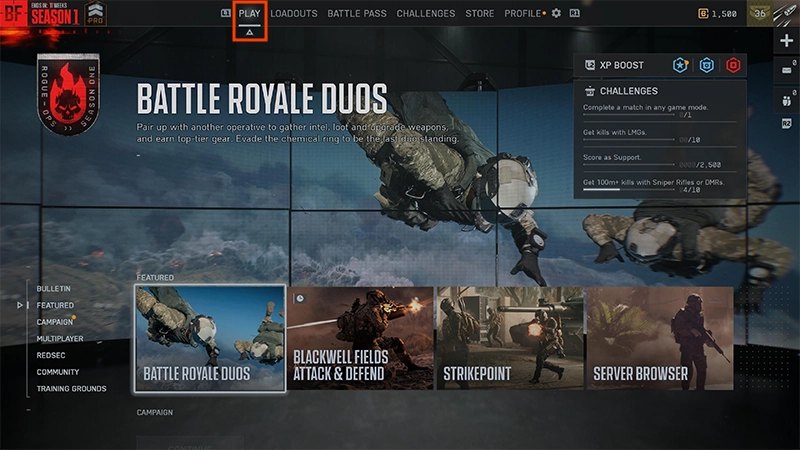
- 1Under the Multiplayer tab, choose Custom Search.
- 2Select a mode.
- 3Choose the maps you want to play on.
- 4Select Play.
Which game mode should I pick in Battlefield 6?
If you’re not sure where to start, here’s how to choose a game mode in Battlefield 6 based on your playstyle.Campaign is Battlefield 6’s Single Player mode. Pick your difficulty, earn rewards by completing missions, and learn about the lore behind NATO and Pax Armata.Learn more about what to expect from Campaign mode.
If you want to play on Battlefield 6’s largest maps, play Conquest, Breakthrough, or Escalation for an all-out warfare experience. Conquest is a fight between two teams where each team tries to capture and hold objectives to deplete the enemy’s lives. Matches last about 20 minutes. In Breakthrough, you play as an attacker or defender trying to win or defend consecutive sectors on a map. Matches can last 20 to 40 minutes.In Escalation, you play on a map filled with objectives. The first team to gain three points wins. Matches can last 20 to 40 minutes.
If you’re looking for tactical gameplay, we recommend playing Rush, King of the Hill, or Domination. In Rush, you play as attackers or defenders. Depending on your role, your mission is to either blow up or defuse bombs on the map’s M-COMS (military communication systems). Rush offers medium-sized maps for a more strategic experience. In King of the Hill, teams fight over one objective at a time, trying to hold the objective for as long as possible. Domination is a small game mode that’s similar to Conquest. Instead of taking objectives, you’ll battle to hold flags.
These modes alternate weekly. To see what’s available this week, check the Play menu in-game.You can play any mode at any time through Battlefield Portal. Learn how to create a Verified Modes experience to choose a mode.
For fast-paced matches that focus on kills, try out Squad Deathmatch and Team Deathmatch.Squad Deathmatch features four teams of four players battling to kill a certain number of players before the other teams do.Team Deathmatch features two teams battling to kill a certain number of players first. Matches usually last about 10 minutes.
Battlefield REDSEC Ranked is a competitive mode that focuses on earning Rank Points to climb each division and rank.Learn how to play and how progression works in our Battlefield REDSEC Ranked guide.
Rapid Royale, a game mode available in Battlefield REDSEC, offers a smaller-scale, higher intensity playstyle. Your goal? Be the last team standing. Up to 36 players can play as Trios or Solos, and matches last around 15 minutes. You’ll need to play aggressively and hunt your enemies to survive.
What are Redeploy Tokens?
Redeploy Tokens are a type of rare loot that let you redeploy a squadmate who’s been eliminated. They’re only available in Rapid Royale mode in Battlefield REDSEC. For a full overview of the mode and how it works, check out our Rapid Royale guide.There are two ways to get Redeploy Tokens. It gets harder to earn Redeploy Tokens as the match continues.
- Find them as loot from Rare Ordnance Drops.
- Earn them as a squad by eliminating other players.
Redeploy Tokens are consumed automatically when a player’s eliminated.
- In Solos, Redeploy Tokens give you one redeployment.
- In Trios, Redeploy Tokens let all eliminated teammates come back to your squad when a member’s been eliminated.
*Requires Battlefield REDSEC (available separately) and all game updates. Applicable platform account and platform subscription (sold separately) may be required. Persistent internet connection and EA account required.